Mastering Depth and Texture with Stipple Photoshop Brushes
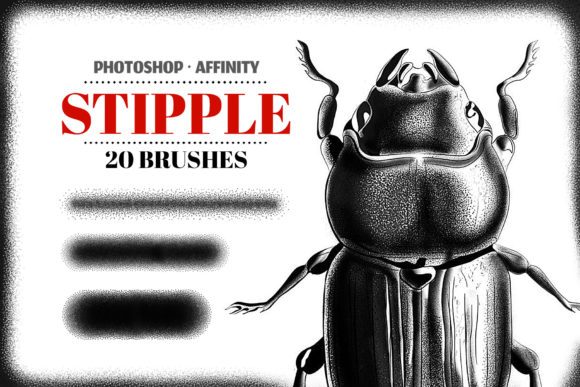
In the evolving landscape of digital art, the pursuit of organic texture remains a constant challenge. As screens become sharper and resolution standards climb, the risk of artwork looking sterile or overly "digital" increases. This is where Stipple Photoshop Brushes bridge the gap between traditional craftsmanship and modern efficiency. Stippling, a technique rooted in drawing with countless tiny dots to create shading and tone, has found a powerful resurgence in the digital realm. By utilizing a specialized set of 20 Stipple Photoshop Brushes in high resolution, artists and designers can instantly inject hand-crafted depth into their projects without the time-consuming labor of placing individual dots manually.
The relevance of these tools extends far beyond simple aesthetic preference; it speaks to a broader shift in how we consume and create visual media. In an era dominated by vector perfection and smooth gradients, there is a growing appetite for imperfection, grit, and tactile quality. Whether you are a professional illustrator, a tattoo artist conceptualizing new pieces, or a marketer looking to differentiate brand assets, understanding how to leverage stippling can transform flat compositions into rich, engaging visuals.
The Renaissance of Analog Textures in Digital Workflows
The current creative climate is witnessing a significant pivot toward retro and vintage aesthetics. From album covers to editorial illustrations, there is a noticeable move away from the glossy, hyper-polished look that defined the early 2010s. Instead, creators are seeking ways to emulate the feel of ink on paper, screen printing, and old-school engraving. Stipple Photoshop Brushes are central to this trend because they replicate the specific mechanical behavior of pen-and-ink dot work.
This shift is not merely nostalgic; it is functional. In a saturated market, textures help images stand out. When a viewer scrolls through a feed of seamless digital gradients, an image with subtle grain and stippled shading catches the eye because it feels human-made. This psychological response drives engagement for bloggers, marketers, and entrepreneurs who need their content to resonate on a personal level. The ability to apply high-resolution stippling allows for toning stunning retro graphics that feel authentic rather than like a filtered afterthought.
Furthermore, the workflow of the modern creator demands speed without sacrificing quality. Traditionally, achieving a true stipple effect required hours of meticulous hand-work. Today, having a curated archive containing a Brushes.abr file means that an artist can establish complex tonal ranges in minutes. This efficiency allows freelancers and business owners to iterate faster, testing different lighting scenarios and textural densities while maintaining a consistent artistic voice.
Technical Advantages of High-Resolution Brush Sets
Not all digital brushes are created equal. A common pitfall for many designers is using low-resolution assets that pixelate when scaled up for large-format prints or high-DPI displays. The value of a dedicated set of 20 Stipple Photoshop Brushes lies specifically in their high resolution. These brushes are engineered to remain crisp whether applied to a small social media graphic or a large-scale wall mural.
High-resolution stippling ensures that the individual dots retain their shape and spacing integrity. This is crucial for illustration texturing, where the density of the dots defines the shadow and form. If the brush resolution is poor, the shadows can turn into muddy blobs rather than a collection of distinct points. For professionals working in advertising or publishing, where print quality is non-negotiable, this level of detail is essential.
Moreover, versatility is key. A robust set offers variety in dot size, spacing, and scatter. Some brushes may be designed for fine, delicate shading suitable for portraiture, while others provide a coarser, heavier texture ideal for grunge backgrounds or bold typography. Having twenty distinct variations within a single archive allows creators to layer effects, creating a custom look that avoids the repetitive patterns often associated with default software brushes.
Cross-Platform Compatibility and Installation
The modern creative ecosystem is rarely confined to a single device. Professionals often switch between desktop powerhouses and mobile tablets depending on their location and immediate needs. Fortunately, these stipple tools are designed with flexibility in mind. To use these brushes effectively, you will need the Photoshop app on your PC for heavy-duty editing, or you can utilize Affinity Designer and Affinity Photo on your iPad for on-the-go creation.
This cross-platform capability reflects the changing habits of the workforce. Freelancers and digital nomads require tools that travel with them. The inclusion of an installation guide for Photoshop in PDF format ensures that even users who are less technically inclined can get started immediately. The process is straightforward: the archive contains the necessary Brushes.abr file, which can be loaded directly into the software's brush preset manager. Once installed, the brushes behave like native tools, responding to pressure sensitivity on supported tablets to mimic the natural variation of hand pressure.
For users of the Affinity suite, the compatibility ensures that the investment in high-quality assets is not locked into a single ecosystem. This openness encourages experimentation, allowing artists to start a concept on an iPad during a commute and finalize the high-resolution details on a desktop workstation later.
Practical Applications Across Industries
The utility of stipple brushes extends into diverse fields, proving that texture is a universal language in design.
- Tattoo Concept Creation: Perhaps one of the most impactful uses is in the tattoo industry. Tattoo artists rely heavily on dot work for shading and aging effects. Using stipple brushes allows artists to draft concepts that accurately represent how ink will settle in the skin over time. It helps clients visualize the final result with greater realism before the needle ever touches skin.
- Retro Graphic Design: Brands aiming for a vintage identity can use these brushes to tone illustrations, giving them a weathered, printed look. This is particularly effective for packaging design, poster art, and apparel graphics where a "lived-in" feel adds perceived value.
- Editorial Illustration: Magazines and online publications often use stippling to add gravitas to opinion pieces or biographical articles. The texture suggests seriousness and craft, distinguishing editorial content from standard stock photography.
- Concept Art and Storyboarding: Game developers and filmmakers use texturing to quickly establish mood. A stippled overlay can instantly suggest a noir atmosphere or a historical setting without requiring fully rendered 3D environments.
Integrating Stippling into Your Creative Process
Adopting these tools requires more than just installation; it involves a shift in how you approach light and shadow. Unlike a standard airbrush which creates smooth transitions, stippling builds tone through accumulation. To get the best results, consider working in layers. Use a lighter opacity brush for base tones and reserve the denser, darker brushes for deep shadows. This method provides greater control and mimics the traditional build-up of ink.
It is also important to consider the context of your project. While stippling adds character, overuse can lead to visual noise. The goal is to enhance the subject, not overwhelm it. Experiment with blending modes in your software; multiplying a stipple layer over a color base can create rich, complex hues that flat colors cannot achieve. For educators and students, these brushes serve as an excellent teaching tool for understanding value and form, demonstrating how light interacts with surface texture.
As technology continues to advance, the line between physical and digital media will continue to blur. Tools like Stipple Photoshop Brushes are not just shortcuts; they are enablers of a hybrid artistic style that honors tradition while embracing the future. Whether you are refining a logo, sketching a tattoo sleeve, or designing a marketing campaign, the ability to apply high-fidelity texture gives you a competitive edge. By integrating these resources into your workflow, you ensure that your digital creations possess the soul and depth of analog art, meeting the high expectations of today's discerning audiences.