Mastering Mono Outline Lettering with 3 Thickness Procreate Brushes
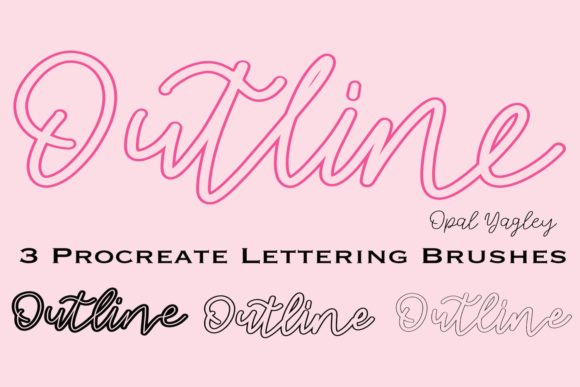
In the evolving landscape of digital art and design, consistency and efficiency are paramount. Whether you are a professional illustrator, a small business owner creating social media assets, or an educator developing visual aids, the tools you choose directly impact your workflow. The Outline Procreate Brushes - 3 Thickness pack represents a specialized solution designed to streamline the creation of mono-outline lettering and decorative elements on the iPad. Unlike generic brush sets that rely heavily on pressure sensitivity to vary line weight, this collection offers a distinct approach: three fixed outline thicknesses that ensure uniformity across every stroke.
Understanding where this tool fits into a broader creative process is essential for maximizing its value. It is not merely a download; it is a component of a structured workflow that prioritizes clarity, speed, and stylistic cohesion. By integrating these brushes into your routine, you eliminate the guesswork often associated with variable-width strokes, allowing you to focus on composition and message rather than technical execution.
Defining the Tool and Its Strategic Role
The Outline Procreate Brushes - 3 Thickness pack includes three specific variants: a Thin Outline Brush, a Medium Outline Brush, and a Thick Outline Brush. These are engineered specifically for the Procreate app on iPad, requiring an iPad Pro, Apple Pencil, or compatible stylus. A critical distinction of this set is its lack of pressure sensitivity regarding line width. While many artists seek brushes that react dynamically to touch, there is a significant use case for static widths. When creating technical diagrams, consistent branding elements, or bold lettering where uniformity is key, pressure-sensitive brushes can introduce unwanted variation. These mono-outline brushes solve that problem by delivering the exact same line weight regardless of how hard you press.
This characteristic makes them particularly valuable for users who may not have mastered pressure control or for those working in environments where speed is more critical than artistic flourish. Furthermore, because they do not rely on pressure data for width, they can even be used effectively with a finger, offering flexibility in casual sketching or quick ideation sessions. However, it is important to note that these assets are exclusive to the Procreate ecosystem. They will not function in Photoshop or other desktop applications, necessitating a mobile-first or tablet-centric workflow.
Integrating Outlines into Your Creative Workflow
Successfully implementing these brushes requires viewing them as part of a larger production pipeline. They can serve different functions depending on the stage of your project.
Pre-Production and Planning
Before diving into final renders, the Thin Outline Brush serves as an excellent tool for rough layout and structural planning. Because the line is fine, it allows for detailed sketching without cluttering the canvas. You can map out typography hierarchies, plan the spacing of decorative elements, or draft the skeleton of an illustration. At this stage, the goal is structure. Using a fixed-width brush ensures that your underlying grid remains consistent, providing a reliable foundation for subsequent layers.
Execution and Refinement
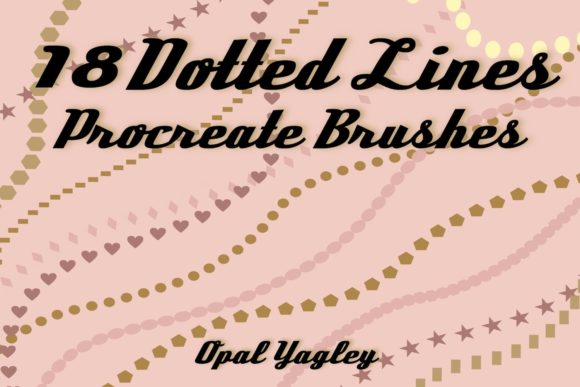
During the active creation phase, the Medium and Thick brushes come into play. This is where the concept of "mono outline lettering" shines. For marketers creating Instagram stories or educators designing worksheets, legibility is non-negotiable. The Medium brush offers a balanced weight suitable for body text or secondary headings, while the Thick brush commands attention for primary titles and call-to-action buttons. Since the brushes are created with love and passion by Opal Yagley, they carry a specific aesthetic quality that feels hand-drawn yet mechanically precise.
Using these brushes in tandem allows for immediate visual hierarchy without needing to adjust settings mid-stream. You simply select the appropriate brush from your library and draw. This reduces cognitive load, letting you maintain flow state. For freelancers managing tight deadlines, this reduction in friction translates directly to billable hours saved.
Post-Production and Consistency Checks
Once the initial drawing is complete, the uniform nature of these outlines simplifies the review process. When handing off files to clients or team members, consistency in line weight conveys professionalism. There is no need to explain why one part of a logo looks heavier than another due to erratic pressure application. The output is predictable. If adjustments are needed, they are structural rather than textural, making edits faster and more intuitive.
Compatibility and Technical Requirements
To leverage this tool effectively, your hardware and software setup must align with specific requirements. First and foremost, you need an iPad. While various models work, the iPad Pro paired with the Apple Pencil offers the most responsive experience, though other styluses are compatible. It is crucial to understand that these brushes are formatted exclusively for Procreate. Attempting to import them into Adobe Fresco, Photoshop, or Affinity Designer will result in errors, as the brush engine code is proprietary to Procreate.
Additionally, the instant download format means you must have a system in place to manage your digital assets. Upon purchasing, the file should be immediately imported into your Procreate brush library. Organizing them into a dedicated group labeled "Mono Outlines" or "Lettering Essentials" ensures they are always accessible when inspiration strikes. Proper organization prevents the common pitfall of downloading resources that never get used because they are lost in a sea of files.
Practical Implementation Tips for Diverse Users
Different professionals can adapt these brushes to their unique needs. Here is how various users might integrate them:
- Content Creators and Marketers: Use the Thick Outline Brush to create bold, eye-catching hooks for video thumbnails or social media posts. The high contrast ensures readability on small screens.
- Educators and Publishers: Utilize the Thin and Medium brushes for creating worksheets, flashcards, or instructional diagrams where clarity is more important than artistic flair. The non-pressure-sensitive nature ensures that printed materials look clean and uniform.
- Small Business Owners: Develop a consistent brand voice by using the same outline thickness for all hand-lettered quotes or product labels. This builds brand recognition through visual consistency.
- Hobbyists: Experiment with decorative patterns. Since the brushes are fun to use and forgiving, they encourage playfulness without the fear of ruining a piece with a misplaced heavy stroke.
Maintaining Quality and Long-Term Usability
Like any digital asset, the longevity of your results depends on how you manage the tool over time. Regularly back up your custom brush library. If you update your iPad OS or the Procreate app, having a backup ensures you don't lose your customized workflow. Furthermore, consider combining these outline brushes with solid fill brushes or texture overlays to create depth. While the outlines provide the structure, adding color or shadow layers beneath them can elevate the final piece from a simple sketch to a polished graphic.
It is also worth noting the limitations to avoid frustration. Since these brushes do not respond to pressure for width variation, they are not suitable for calligraphy styles that require thick downstrokes and thin upstrokes within a single letter. Recognizing this boundary helps you select the right tool for the job. If you need dynamic variation, these brushes serve best as a complementary tool alongside a traditional calligraphy set, perhaps used for borders or emphasis rather than the main script.
Conclusion: Elevating Efficiency Through Specialization
The Outline Procreate Brushes - 3 Thickness pack is more than a collection of digital stamps; it is a workflow enhancer. By offering three distinct, fixed weights, it removes variables that can slow down production and compromise consistency. Whether you are drafting a complex diagram, lettering a motivational quote, or designing a brand asset, these brushes provide the reliability needed to execute your vision efficiently. Created with passion by Opal Yagley, they invite users to have fun while maintaining professional standards. As you integrate them into your iPad toolkit, remember that the true power lies not just in the brushes themselves, but in how strategically you deploy them within your creative process.