Evaluating the 45 Pencil Brushes for Procreate Pack for Digital Sketching and Lettering
Digital artists often face a paradox of choice when selecting tools for their iPad workflow. While Procreate comes with a robust default library, many professionals seek specialized assets to replicate specific traditional media textures or streamline complex workflows. The 45 Pencil Brushes for Procreate pack represents one such specialized resource, designed specifically to bridge the gap between analog tactile feel and digital efficiency. This collection is not merely an expansion of quantity but a curated set aimed at sketching, texturing, and hand lettering. Understanding whether this specific bundle aligns with your artistic needs requires a careful evaluation of its composition, compatibility, and licensing terms compared to building a custom library or purchasing broader, less focused alternatives.
Composition and Functional Categories
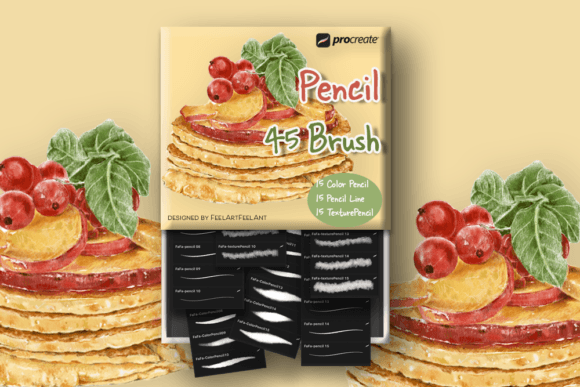
The core value of this product lies in its structured division. Rather than offering a random assortment of strokes, the pack is segmented into three distinct functional categories: 15 Color Pencils, 15 Pencil Lines, and 15 Texture Pencils. This tripartite structure addresses the primary stages of a typical illustration workflow.
The Color Pencil subset is engineered to mimic the grainy, layered application of wax or oil-based colored pencils. In a digital environment, achieving this look often requires adjusting grain settings and blending modes manually. These brushes come pre-configured to respond to pressure and tilt, allowing for natural color buildup without the "plastic" smoothness that sometimes plagues digital coloring. For artists focusing on botanical illustration, character concept art, or soft shading, this category offers a significant time-saving advantage over tweaking default settings.
The Pencil Line brushes serve a different purpose, prioritizing precision and line weight variation. These are critical for the initial sketching phase or for ink-style line work where consistency and control are paramount. Unlike generic sketching tools that may feel too slippery on the glass screen of an iPad, these brushes often incorporate subtle texture to provide friction, simulating the resistance of paper against graphite. This can be particularly beneficial for artists transitioning from traditional media who struggle with the lack of tactile feedback on a tablet.
Finally, the Texture Pencil category adds depth to finished pieces. These tools are essential for breaking up flat colors and adding organic imperfections that make digital art feel more human. When comparing this pack to general-purpose brush sets, the dedicated focus on texture within a pencil framework is a notable distinction. Many broad packs include texture brushes, but they are often paint-based or ink-based; having texture specifically tuned for pencil workflows allows for more cohesive styling throughout the entire piece.
Compatibility and Technical Constraints
A crucial factor in evaluating any digital asset is its ecosystem compatibility. The 45 Pencil Brushes for Procreate are explicitly designed for the Procreate application on iPad, requiring version 5.0.8 or later (including 5X). This specificity is both a strength and a limitation. For users deeply embedded in the Apple ecosystem with an iPad and Apple Pencil, the integration is seamless. The brushes leverage Procreate's specific rendering engine to handle grain, stabilization, and pressure curves effectively.
However, this specialization means the product is non-transferable. These brushes do not function in Adobe Photoshop, Clip Studio Paint, or Affinity Designer. Artists who maintain a hybrid workflow—sketching on an iPad but finishing in Photoshop on a desktop—must consider this restriction carefully. While it is possible to export artwork as PSD files, the brush dynamics and textures will not translate if you attempt to recreate the strokes in another program. If cross-platform flexibility is a priority, a vector-based solution or a universal brush format might be a more prudent investment, despite the potential loss of the specific aesthetic this pack offers.
Furthermore, the reliance on the Apple Pencil cannot be overstated. While third-party styluses exist, the nuanced pressure sensitivity and tilt recognition required to fully utilize the 15 Color Pencil and Texture variants are optimized for Apple's hardware. Users employing alternative input methods may find the performance inconsistent, lacking the dynamic range intended by the brush creator.
Licensing and Commercial Viability
For professional illustrators and designers, the licensing terms of digital assets are often as important as their visual quality. This brush pack offers a generous commercial license regarding end products. Users are authorized to create unlimited physical and digital products for sale using artwork generated with these brushes. This means an artist can sell prints, merchandise, or digital downloads of their illustrations without owing royalties to the brush creator. This "create-to-sell" model is standard for high-quality asset stores but remains a vital selling point for freelancers looking to monetize their output immediately.
It is equally important to understand the restrictions. The license explicitly prohibits the resale, sharing, or redistribution of the brush files themselves. You cannot package these brushes into your own brush set or gift them to a colleague. This protects the intellectual property of the original designer. Additionally, the nature of the product being digital means that sales are final, with no refunds, exchanges, or cancellations accepted. This is a common policy in the digital marketplace due to the inability to "return" a downloaded file. Potential buyers should ensure their device compatibility and software version before purchasing, as technical incompatibility is typically not grounds for a refund. Support is available for download issues, but the onus is on the buyer to verify their setup.
Comparative Analysis: Specialized Packs vs. General Libraries
When deciding whether to acquire the 45 Pencil Brushes for Procreate, one must weigh it against the alternative of using Procreate's default library or purchasing massive "mega-packs." The default Procreate brushes are excellent and highly customizable, but they require time and technical knowledge to modify. An artist spent hours tweaking grain scales and opacity limits to achieve a specific colored pencil look might find this pre-made pack to be a valuable shortcut.
Conversely, large mega-packs containing hundreds of brushes often suffer from "bloat." They may include dozens of variations that go unused, cluttering the interface and making it difficult to locate the right tool quickly. A focused pack of 45 brushes reduces decision fatigue. By limiting the options to three clear categories, the artist can master the tools faster and develop a consistent style. This approach favors depth over breadth.
However, there are trade-offs. A specialized pencil pack will not replace the need for watercolor, ink, or marker brushes. If an artist requires a diverse range of media within a single project, they will still need to supplement this pack with other resources. Therefore, this product is best viewed as a component of a larger toolkit rather than a standalone solution for all artistic needs. It is ideal for specialists—such as lettering artists or sketchers—who prioritize pencil aesthetics above all else.
Decision Factors for the Modern Artist
Ultimately, the decision to invest in this brush set depends on your current workflow pain points. If you find yourself constantly dissatisfied with the texture of your digital lines or spend excessive time trying to simulate traditional media, this pack offers a targeted solution. The inclusion of specific tools for hand lettering also makes it attractive for calligraphers and typographers working on the iPad, where stroke consistency is key.
On the other hand, if you are a beginner still learning the basics of the Procreate interface, starting with the default brushes might be more educational. Modifying default settings teaches you how digital brushes function, whereas using pre-sets hides that mechanics. Similarly, if you work primarily in vector formats or require strict cross-software compatibility, the limitations of this Procreate-exclusive pack may outweigh its benefits.
In conclusion, the 45 Pencil Brushes for Procreate serves a specific niche effectively. It provides a high-quality, commercially viable set of tools for artists seeking authentic pencil textures and streamlined lettering capabilities within the Procreate ecosystem. While it lacks cross-platform versatility and carries a strict no-refund policy typical of digital goods, its focused curation offers a practical advantage for those ready to elevate their digital sketching and coloring workflow. As with any creative tool, its value is determined by how well it integrates into your unique process and whether its specific strengths align with your artistic goals.