Mastering Digital Chalk Art with the Chalk Brushes Palette for Procreate
Creating authentic-looking chalkboard art in a digital environment has long been a challenge for illustrators, teachers, and social media managers. The texture of real chalk, the way it dusts across a rough surface, and the specific blend of colors are difficult to replicate with standard digital tools. This is where the Chalk Brushes Palette for Procreate becomes an essential resource. Designed specifically to mimic the organic feel of traditional sidewalk and blackboard chalk, this collection offers a streamlined solution for artists who want the aesthetic of analog media without the mess or permanence errors.
Whether you are designing menu boards for a café, creating educational materials for a classroom, or crafting whimsical invitations for a wedding, achieving that hand-lettered look is crucial. The struggle often lies in finding brushes that do not look too uniform or "digital." Standard stylus strokes can appear sterile, lacking the grainy variation that makes chalk art so charming. By utilizing a specialized set of hand-created digital brushes, you bridge the gap between technology and tradition, allowing for expressive, textured work that resonates with viewers on a human level.
Overcoming the Limitations of Standard Digital Tools
Many iPad artists start with default brush sets, only to find they cannot achieve the desired opacity variations or texture depth required for chalk effects. The primary goal when creating chalk-style artwork is authenticity. You need a tool that responds to pressure like real chalk, building up color gradually and allowing for blending that looks natural rather than pixelated.
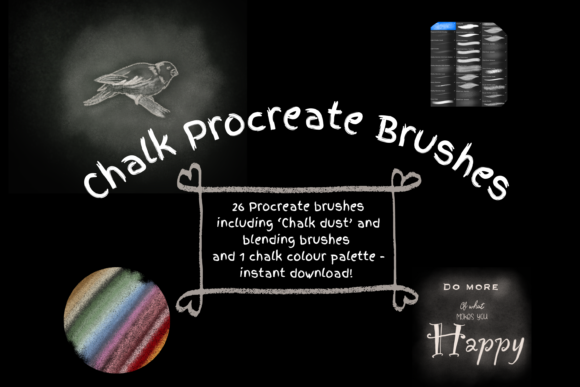
The Chalk Brushes Palette for Procreate addresses these specific needs by providing 26 unique individual digital brushes. Unlike generic texture overlays, these brushes are engineered to function as both blending tools and paint applicators. This dual functionality is vital because real chalk art relies heavily on smudging and layering to create depth and shadow. With this pack, you are not just drawing lines; you are simulating the physical interaction of chalk dust on a porous surface.
Furthermore, one of the most common hurdles in digital chalk art is color selection. Chalk colors are rarely pure; they are often pastel, dusty, or muted. This bundle includes a curated color palette designed to complement the brushes, saving you hours of trial and error trying to mix the perfect shade of slate blue or dusty rose. Having these resources ready allows you to focus on composition and lettering rather than technical setup.
Practical Applications and Creative Outcomes
The versatility of this brush set opens doors for various professional and personal projects. For small business owners, particularly in the food and beverage industry, digital chalkboard menus are a cost-effective way to maintain a rustic brand image while having the flexibility to update offerings instantly. Using the Chalk Brushes Palette for Procreate, a designer can create a master template that looks hand-drawn every single time, ensuring brand consistency without hiring a calligrapher for daily updates.
Educators and content creators also benefit significantly. Teachers creating remote learning materials can use these brushes to make worksheets and presentation slides feel more engaging and less corporate. The tactile feel of the brushes helps retain student attention by mimicking the familiar classroom blackboard experience. Similarly, lifestyle bloggers and influencers can craft eye-catching story highlights or quote graphics that stand out against the polished, high-gloss aesthetic typical of social media feeds.
The outcome of using these tools is a portfolio of work that feels warm and inviting. Because the brushes allow for resizing and opacity adjustments, you can create everything from fine, detailed script to bold, sweeping headlines. The ability to alter the strength of the blend ink charge via the opacity slider means you can control how "dusty" or solid your strokes appear, giving you complete artistic control over the final render.
Maximizing Your Workflow with Procreate
To get the most out of the Chalk Brushes Palette for Procreate, understanding the technical workflow is key. These files are digital assets that function exclusively within the Procreate app on an iPad. It is important to note that to utilize these brushes effectively, you will need an Apple Pencil and the Procreate app installed on an iPad Pro or compatible iPad model. The pressure sensitivity of the Apple Pencil is what unlocks the dynamic range of these brushes, allowing the line weight and texture to respond naturally to your hand movements.
Installation is straightforward but requires a few specific steps. You will need a platform to download the files, such as iCloud, and a utility program like iZip to unzip the files once downloaded. Once extracted, the files can be imported directly into Procreate, where they will appear in a named folder for easy organization. This structured approach ensures your library remains tidy and your favorite tools are always accessible.
When beginning a new project, a highly recommended technique is to start with a dark background. Chalk art is defined by light pigment on a dark surface. By setting your canvas to a deep charcoal, slate, or black, the textures of the brushes immediately pop, providing instant visual feedback on how the "chalk" is interacting with the "board." You can resize any of the 26 brushes using the brush resize tool in Procreate or by using the move and resize tool on your layers, offering flexibility whether you are working on a small icon or a large poster.
Tailoring the Experience to Your Skill Level
Different users will approach the Chalk Brushes Palette for Procreate in unique ways based on their experience levels. Beginners may find the included color palette and pre-set textures to be a safety net, allowing them to produce professional-looking results immediately without needing advanced knowledge of color theory or texture mapping. The intuitive nature of the brushes means that even a novice can create beautiful, blended effects simply by experimenting with the opacity slider and blend modes.
Conversely, advanced digital artists will appreciate the granular control these brushes offer. The ability to use the brushes as blend tools allows for complex shading techniques that mimic the layering of real chalk sticks. Professionals can combine these brushes with other Procreate features, such as clipping masks and adjustment layers, to create sophisticated compositions that go beyond simple lettering. They might use the texture to add grit to a character design or to create atmospheric backgrounds that feel hand-crafted.
Regardless of your skill level, the core value lies in the efficiency and quality these tools provide. They eliminate the friction between your creative idea and the final execution. Instead of fighting against stiff digital lines, you are empowered to flow with the medium. The hand-created nature of the brushes ensures that no two strokes look exactly alike, preserving the imperfection that makes art feel human.
In conclusion, if you are seeking to elevate your digital illustrations with the warmth and texture of traditional chalk, this brush set provides the necessary foundation. It solves the common problems of sterility and uniformity in digital art, offering a robust toolkit for educators, designers, and hobbyists alike. By integrating the Chalk Brushes Palette for Procreate into your workflow, you gain the freedom to create stunning, authentic chalkboard pieces that captivate audiences and streamline your creative process. Remember to check the listing pictures for a visual preview of the included brushes, and ensure your iPad and Apple Pencil are ready to bring your chalky visions to life.