Mastering Animal Textures in Procreate
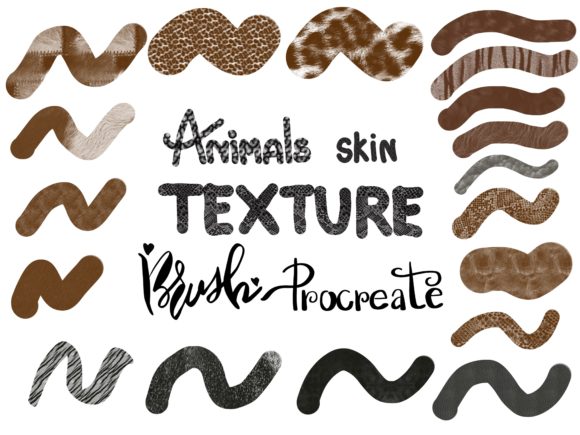
Digital art has revolutionized how we create, offering tools that mimic reality with startling accuracy. Among the most challenging aspects of digital illustration is replicating the organic complexity of nature. This is where specialized tools like Animals Skin Texture Brushes for Procreate become indispensable. Whether you are sketching a quick concept or rendering a hyper-realistic portrait, having the right texture at your fingertips can transform a flat image into a living, breathing piece of art. This collection, featuring 36 distinct brushes and a complementary 60-color palette, serves as a bridge between technical limitation and artistic vision.
Understanding the value of these tools requires looking beyond the file size or the price tag. It is about how different creators integrate them into their unique workflows. For some, it is a matter of speed; for others, it is about achieving a level of detail that would take hours to paint by hand. The "Infinity Art Works" collection offers a specific solution to a common problem: creating believable fur, scales, and skin without getting lost in the minutiae of individual hair strokes.
Why Texture Matters Across Different Disciplines
The need for realistic animal textures spans a wide variety of industries and hobbies. However, the priority placed on these tools varies significantly depending on who is holding the Apple Pencil.
For professional illustrators and concept artists, time is often the most critical resource. When working on tight deadlines for publishing houses or game studios, the ability to lay down a convincing base texture quickly is invaluable. These professionals evaluate tools based on reliability and flexibility. They need brushes that respond predictably to pressure sensitivity, allowing them to build up layers of depth without the software lagging or the stroke looking repetitive. A set of 36 varied brushes allows them to switch instantly from the coarse hide of an elephant to the soft down of a chick, maintaining momentum in their creative process.
In contrast, educators and students might prioritize the learning value and ease of use. For a beginner, staring at a blank canvas can be intimidating. Knowing exactly how to render snake scales or wolf fur can feel like an insurmountable hurdle. Pre-made texture brushes act as a scaffold, allowing learners to focus on composition, lighting, and anatomy while the brush handles the complex surface details. The included 60-color palette further supports this by removing the guesswork of color theory, providing a curated selection of tones that work harmoniously together.
Tailoring the Tool to Your Creative Goals
Not every creator needs the same features from a brush set. Understanding your own goals helps determine if this specific collection aligns with your needs.
- Hobbyists and Enthusiasts: If you draw for relaxation, your primary goal is likely enjoyment and expression. You may not need industrial-grade speed, but you do want results that look impressive with minimal frustration. These brushes allow hobbyists to create shareable, high-quality artwork for social media without needing years of technical training.
- Small Business Owners and Marketers: For those creating branding materials, merchandise, or marketing assets featuring animals, consistency is key. A cohesive set of brushes ensures that a logo mascot or a product illustration maintains a uniform style. The commercial value here lies in the ability to produce professional-looking assets in-house, reducing the need to outsource simple texturing tasks.
- Publishers and Bloggers: Content creators often need visuals that stop the scroll. Unique textures can make an article header or a book cover stand out in a crowded feed. The versatility of having 36 different options means a blogger can cover diverse topics—from marine life to savannah mammals—without the visuals feeling stale or recycled.
Practical Application and Workflow Integration
Integrating new tools into an existing workflow should be seamless. The Animals Skin Texture Brushes are designed specifically for the iPad ecosystem, leveraging the full potential of the Apple Pencil's pressure sensitivity. This ensures that a light touch creates fine details, while pressing harder deposits more pigment or changes the stroke width, mimicking traditional media.
Consider a freelance artist working on a children's book. They might use the softer brushes in the set to create fluffy, approachable characters for the protagonist, while utilizing the rougher, scaled textures for background elements or antagonists. The included color palette accelerates this process, offering immediate access to earthy tones, vibrant reptilian hues, and subtle mammalian shades. This reduces the time spent mixing colors manually, allowing the artist to focus on storytelling.
On the other hand, a scientific illustrator might use these brushes to achieve anatomical accuracy. While they will still need to reference real-life photos, having a brush that naturally creates the pattern of a jaguar's rosettes or the overlapping nature of fish scales provides a solid foundation. They can then refine these base layers to meet strict scientific standards. The flexibility of the Procreate app, combined with these specialized brushes, supports both stylized and realistic approaches.
Getting Started with Your New Tools
Once you have decided that these tools fit your creative profile, the setup process is straightforward. The digital nature of the product means there is no shipping wait time, but it does require a few specific steps to ensure everything works correctly on your device.
- Purchase and Confirmation: After completing your payment, keep an eye on your email inbox. You will receive a confirmation message containing a secure download link. It is advisable to check your spam folder just in case.
- Download the Files: Click the link to download the brush set and the color palette file directly to your iPad or a cloud storage service accessible from your iPad.
- Import to Procreate: Open the Procreate app. Tap on the brush library icon, then select "Import." Navigate to the downloaded files and tap them. Procreate will automatically install the 36 brushes and the 60-color palette into your library.
It is important to note that compatibility is specific. These are digital assets engineered for the Procreate App on iPad. They require an iPad Pro, a standard iPad, or an iPad Mini paired with an Apple Pencil or a third-party stylus that supports pressure sensitivity. Without pressure sensitivity, the dynamic range of the brushes—such as varying line weight and opacity based on touch—will not function as intended.
Making the Right Choice for Your Art
Ultimately, the decision to invest in specialized brushes comes down to what you want to achieve. If your current workflow involves painting every single hair or scale manually, and you find it slows down your production or drains your enthusiasm, a dedicated texture set can be a game-changer. It shifts the burden of repetition from your hand to the algorithm, freeing you to make higher-level artistic decisions.
However, if you are strictly focused on abstract art or geometric design, these organic textures might not be immediately relevant. That is the beauty of the digital art marketplace; you can curate a toolkit that matches your specific niche. For anyone drawn to wildlife, fantasy creatures, or character design involving animals, this collection offers a robust starting point. It balances the need for quality with the demand for efficiency, catering to everyone from the weekend doodler to the seasoned studio professional.
By understanding how these tools fit into your specific context, you can maximize their potential. Whether you are looking to speed up your client work, enhance your learning curve, or simply enjoy the tactile feel of painting realistic fur on a glass screen, the right resources make all the difference. Thank you for exploring the possibilities with Infinity Art Works, and here is to creating your next masterpiece with confidence and ease.