Mastering Paint on Canvas ProCreate Brushes
Digital art has long struggled to replicate the tactile satisfaction of traditional media. There is a specific weight to a brushstroke on textured paper, a way pigment settles into the grain, that flat pixels often fail to capture. This is where Paint on Canvas ProCreate Brushes change the workflow entirely. These are not merely digital tools; they are sophisticated simulations designed to bridge the gap between the screen and the studio. By integrating complex texture maps and dynamic stroke behaviors, they allow artists to create work that feels organic, imperfect, and undeniably human.
For anyone holding an iPad and Apple Pencil, the difference between a standard digital brush and a high-quality canvas simulation can be the difference between a piece that looks "digital" and one that looks like a finished painting. The technology behind these brushes mimics the interaction of bristles with weave, allowing paint to build up, scatter, and blend in ways that respect the underlying surface. Whether you are sketching a quick concept or rendering a final illustration, the tool you choose dictates the soul of the image.
Why Texture Matters Across Different Creative Roles
The value of realistic brush tools shifts depending on who is holding the stylus. A tool that saves time for a professional might offer a learning shortcut for a student, while providing a unique aesthetic for a content creator. Understanding these nuances helps in selecting the right assets for your specific goals.
For beginners and hobbyists, the primary appeal often lies in accessibility and confidence building. Traditional painting requires a significant investment in supplies, space, and cleanup. More importantly, it demands a level of motor control that can be discouraging when starting out. High-quality canvas brushes in ProCreate remove the fear of ruining expensive materials. A beginner can experiment with thick impasto strokes or delicate glazes without waste. Furthermore, these brushes often come with built-in textures that make even simple strokes look accomplished, providing immediate visual gratification that encourages continued practice.
Experienced digital artists and illustrators approach these tools with a different metric: flexibility and integration into an existing pipeline. They are less concerned with the novelty of the texture and more focused on how the brush behaves under pressure, tilt, and speed. For this group, Paint on Canvas ProCreate Brushes are evaluated on their ability to streamline the rendering process. Can the brush handle both broad washes and fine details? Does it blend naturally with other layers? Professionals often seek brushes that reduce the need for post-processing filters, allowing them to achieve a traditional look directly within the app, saving hours of editing time.
The Business and Educational Perspective
Beyond the act of creation, these tools hold significant value for educators, marketers, and small business owners. In an educational setting, demonstrating artistic principles like light, shadow, and texture is far more effective when the digital tool behaves predictably like its physical counterpart. Teachers can show students how paint interacts with canvas grain in real-time, making abstract concepts tangible. The reliability of these brushes ensures that tutorials are consistent, helping students translate digital skills to physical media and vice versa.
For entrepreneurs and content creators, the aesthetic quality of visuals is currency. In a saturated market of sleek, vector-based graphics, artwork that features visible brushstrokes and canvas texture stands out. It signals authenticity and craftsmanship. A blogger or social media manager using these brushes can create custom headers, story highlights, or product mockups that feel handcrafted rather than templated. This "human touch" can increase engagement, as audiences often connect more deeply with imagery that appears to be made by a person rather than generated by an algorithm.
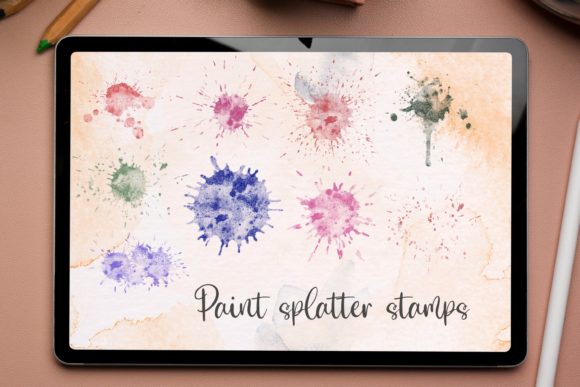
Consider the freelancer working on tight deadlines. Their priority is often speed without sacrificing quality. Hand-painted stamp brushes, often paired with canvas textures, allow for rapid composition. Instead of painting every leaf on a tree or every brick on a wall, a freelancer can use intelligent stamps that vary in rotation and opacity to build complex scenes quickly. When combined with a realistic canvas overlay, these shortcuts do not look repetitive; they look like efficient, skilled painting.
Evaluating Quality: What to Look For
Not all brush sets are created equal. When exploring options for Paint on Canvas ProCreate Brushes, several factors determine whether a set will become a staple in your library or gather digital dust.
- Texture Integration: The best brushes do not just slap a texture over a stroke; they interact with it. Look for brushes where the paint appears to sit on top of the canvas weave in some areas and settle into the grooves in others. This depth creates realism.
- Customizability: No two artists work the same way. High-quality brushes should allow you to adjust grain, flow, opacity, and size limits via the ProCreate studio settings. Flexibility ensures the tool grows with your evolving style.
- Performance: Complex textures can sometimes lag on older devices. A well-optimized brush set maintains smooth stroke latency even at high resolutions, which is crucial for maintaining the flow of ideas.
- Versatility: Does the set include only oil paints, or does it offer watercolors, acrylics, and dry media like charcoal? A comprehensive set allows for mixed-media approaches within a single file.
Practical Applications for Varied Projects
To understand the true utility of these tools, consider specific scenarios. A children's book illustrator might use soft, textured watercolor brushes to create dreamy, inviting backgrounds that feel safe and warm. The canvas grain adds a storybook quality that flat colors cannot achieve. Conversely, a concept artist designing environments for a video game might utilize rough, heavy-body acrylic brushes to block out forms quickly, relying on the texture to suggest detail before refining the geometry.
For the graphic designer creating branding materials, hand-painted elements can soften a corporate identity. Using a textured brush to create a logo mark or a background pattern adds a layer of sophistication and uniqueness that stock vectors lack. It suggests that the brand values artisanal quality.
It is also worth noting the role of hand-painted stamp brushes. These are distinct from standard stroke brushes. While a stroke brush follows the movement of your hand, a stamp brush deposits a pre-painted shape. When these stamps are derived from real paint on canvas, they provide instant realism. A landscape artist can populate a foreground with realistic grass tufts or rocks that already possess the correct lighting and texture, allowing them to focus on composition rather than rendering every individual element from scratch.
Making the Right Choice for Your Workflow
Ultimately, deciding whether to invest time in mastering Paint on Canvas ProCreate Brushes comes down to your desired outcome. If your goal is clean, scalable vector-style graphics, these tools may be unnecessary. However, if you seek warmth, depth, and the imperfection that characterizes human artistry, they are indispensable.
For the consumer looking to decorate their home with digital prints, art created with these brushes offers the visual richness of traditional paintings at a fraction of the cost. For the publisher, it means acquiring illustrations that reproduce beautifully in print, retaining their texture even after scaling. For the marketer, it provides a visual language that cuts through the noise of polished, artificial imagery.
The journey into textured digital painting is not just about downloading a new file; it is about shifting your mindset to embrace the capabilities of your digital canvas. By understanding how different audiences leverage these tools—from the student seeking forgiveness to the professional demanding efficiency—you can better identify which features align with your own creative vision. Whether you are looking to speed up your workflow, learn fundamental painting principles, or simply add a touch of humanity to your digital creations, the right brush set serves as the conduit between your imagination and the screen.