Evaluating Basic Patterns 1.0 Procreate Brushes for Digital Design Workflows
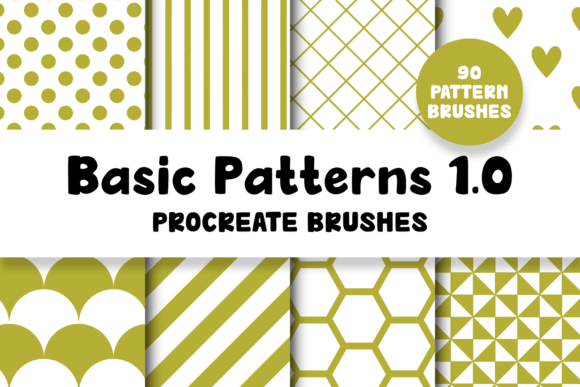
For digital artists and designers working within the iPad ecosystem, selecting the right toolset is critical for maintaining an efficient workflow. The Basic Patterns 1.0 Procreate Brushes pack represents a specific utility designed to streamline the creation of textured backgrounds and repetitive design elements. This collection includes 90 distinct brushes intended to simulate various basic patterns directly within the Procreate application. Understanding the scope, limitations, and practical applications of this toolset is essential for determining whether it aligns with your current project requirements or if alternative methods might better serve your goals.
Overview of the Toolset
The core function of Basic Patterns 1.0 Procreate Brushes is to provide immediate access to a wide variety of patterned strokes without the need to manually draw each element. The package is delivered as a single .brushset file, weighing approximately 41.7 MB. Upon installation, the brushes are organized into sub-categories, a structural choice that aids in navigation when dealing with a library of 90 different options. This organization allows users to quickly locate specific textures, such as grids, dots, lines, or organic repeats, depending on the aesthetic needed for a particular layer or composition.
It is important to note the technical prerequisites for using this asset. These brushes are exclusively compatible with Procreate version 5 or higher. They will not function in earlier versions of the software, nor are they compatible with other digital painting applications like Adobe Fresco, Clip Studio Paint, or Photoshop. Furthermore, while the brushes can be used with finger input, maximal control and precision typically require a compatible Apple Pencil. This hardware dependency is a standard consideration for serious Procreate users but remains a factor for those utilizing older iPad models or alternative styluses.
Practical Benefits and Use Cases
The primary advantage of integrating Basic Patterns 1.0 Procreate Brushes into a workflow is speed. For professionals who frequently need to add texture to backgrounds, create halftone effects, or establish geometric underlays, these brushes eliminate the time-consuming process of creating patterns from scratch. Instead of drawing hundreds of individual dots or lines, a user can apply a consistent pattern with a single stroke. This efficiency is particularly valuable in industries with tight turnaround times, such as social media content creation, quick concept art, or textile surface design prototyping.
Another significant benefit is consistency. When manually drawing repetitive elements, slight variations in spacing or size are inevitable. These pre-configured brushes ensure that the pattern remains uniform throughout the stroke, providing a clean, professional look that can be difficult to achieve freehand. For educators or students learning about pattern recognition and texture application, this toolset offers a sandbox environment to experiment with how different repeats interact with color and layer blending modes without the barrier of technical execution.
Ideal Scenarios for Implementation
This brush pack is a strong fit for users who need to enhance existing illustrations with subtle textures. For example, a character artist might use a noise or grain pattern brush to add depth to clothing fabrics. Similarly, graphic designers creating mockups for packaging or stationery can utilize these brushes to visualize how a pattern might look on a physical product before committing to a vector-based repeat in desktop software. The variety of 90 brushes ensures that there is likely a starting point for most common textural needs, reducing the reliance on external image imports.
Critical Limitations and Considerations
While the utility of Basic Patterns 1.0 Procreate Brushes is clear, potential users must carefully evaluate a specific limitation outlined by the developer: these brushes cannot be used to create seamless repeat patterns. Although the brush stamp itself may be seamless, the act of painting with a brush in Procreate does not generate a tileable file suitable for fabric printing, wallpaper production, or web backgrounds that require infinite looping without visible seams. This is a fundamental constraint of the brush engine in this context.
If your primary goal is to create a commercial-grade, seamless repeat for manufacturing or large-scale printing, this toolset alone will not suffice. In such cases, the brushes serve best as a visualization aid rather than a final production tool. Users would still need to export their designs and finalize the repeating logic in dedicated vector software like Adobe Illustrator or specialized pattern-making tools. Expecting this brush pack to replace a full pattern-design workflow could lead to frustration and additional rework.
Comparative Analysis and Alternatives
When deciding whether to acquire Basic Patterns 1.0 Procreate Brushes, it is helpful to compare it against other methods of achieving similar results. One alternative is importing raster images as stamps. While this offers flexibility, it lacks the optimized performance and categorization of a dedicated brush set. Another alternative is using Procreate's built-in drawing guides and symmetry tools to manually construct patterns. This method offers total control and true seamlessness but requires significantly more time and technical skill.
For users who find the 90-brush limit of version 1.0 restrictive, the developer notes the existence of Basic Patterns 2.0. This newer iteration reportedly includes additional patterns and new brush functions. If your workflow demands a broader vocabulary of textures or more advanced dynamic properties, investigating the 2.0 version may be a more prudent investment than starting with the foundational 1.0 pack. However, for beginners or those with modest texturing needs, the original 1.0 set provides a cost-effective entry point.
Making an Informed Decision
Ultimately, the decision to integrate Basic Patterns 1.0 Procreate Brushes depends on your specific definition of "pattern work." If your objective is to quickly apply textures, backgrounds, and decorative elements within an illustration or composite image on an iPad, this toolset offers a high-value solution that balances variety with ease of use. The organized sub-categories and substantial number of options make it a practical addition to a digital artist's library.
However, if your work strictly involves creating tileable assets for mass production where mathematical precision and seamlessness are non-negotiable, you should view this product as a supplementary sketching tool rather than a primary solution. By understanding both the efficiencies it offers and the technical boundaries regarding seamless repeats, you can determine if this brush pack complements your existing toolkit or if your resources are better allocated toward more robust pattern-design software. Evaluating your current project pipeline against these capabilities will ensure that the tool serves your creative intent effectively.