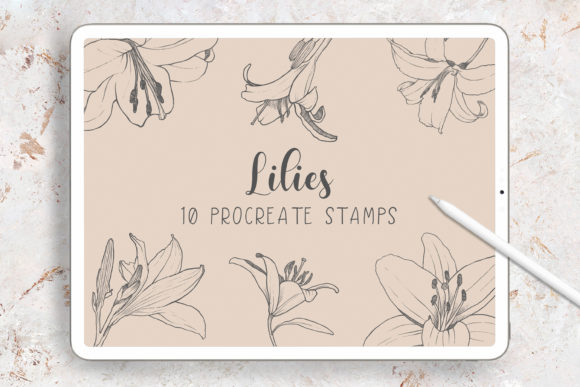
Evaluating Lilies Procreate Stamp Brushes for Digital Floral Design
Digital illustration has evolved from simple sketches to complex, layered compositions that rival traditional media. For artists working within the iPad ecosystem, the choice of digital tools often dictates the efficiency and aesthetic quality of the final output. Among the myriad of resources available, Lilies Procreate Stamp Brushes offer a specialized solution for those seeking to incorporate botanical elements into their work without the time investment of drawing every petal from scratch. This set, comprising ten hand-drawn lily stamps, represents a specific category of digital asset designed to streamline workflow while maintaining an organic, artistic feel.
Understanding whether this specific brush set aligns with your creative needs requires a clear assessment of your current hardware, software environment, and project goals. Unlike generic shape tools or vector libraries, these brushes are crafted to function specifically within the raster-based environment of Procreate. They are digitally hand-drawn, ensuring that each stamp carries the nuances of human artistry rather than the sterile perfection of algorithmic generation. However, like any specialized tool, they come with distinct parameters regarding compatibility and application that potential users must consider before integration.
Technical Compatibility and Hardware Requirements
The first and most critical factor in evaluating Lilies Procreate Stamp Brushes is technical compatibility. These assets are not universal; they are engineered exclusively for the Procreate app on iPad. This limitation is inherent to the file format (.brushset) and the rendering engine of the software. Users attempting to import these files into desktop applications such as Adobe Photoshop or Illustrator will find them incompatible. The architecture of Procreate's brush engine allows for dynamic pressure sensitivity and texture mapping that differs significantly from desktop counterparts.
Furthermore, the optimal use of these brushes presupposes the possession of an Apple Pencil. While Procreate can be operated with touch input, the nuanced control required to place, rotate, and scale stamp brushes effectively is best achieved with a stylus. The Apple Pencil allows for precise placement, which is crucial when arranging delicate floral elements like lilies into borders or intricate backgrounds. Without this hardware, the user experience may feel cumbersome, reducing the efficiency gains that stamp brushes are intended to provide. Therefore, this product is best suited for artists who have already invested in the iPad and Apple Pencil ecosystem and are looking to expand their existing library within that specific workflow.
Artistic Characteristics and Hand-Drawn Quality
What distinguishes Lilies Procreate Stamp Brushes from many other digital floral resources is their origin. Each of the ten lily variations included in the set is digitally hand-drawn. This process imparts a level of irregularity and texture that is often missing from vector-based clip art or procedurally generated shapes. In digital design, "perfection" can sometimes read as artificial. The slight variations in line weight, petal curvature, and shading found in hand-drawn stamps help create compositions that feel more organic and less manufactured.
When comparing these stamps to drawing lilies manually for every project, the trade-off becomes clear. Manual drawing offers unlimited customization but demands significant time and consistent skill. Using a stamp brush sacrifices some degree of unique variation per stroke in exchange for speed and consistency. However, because these specific stamps are hand-drawn rather than photo-traced, they retain an illustrative quality that blends seamlessly with other hand-drawn elements in a piece. This makes them particularly effective for projects where a cohesive, illustrative style is desired, such as custom invitations, branding packages, or sticker designs.
Versatility in Application
The utility of this brush set extends beyond simple decoration. The ten included lily designs are versatile enough to serve multiple functions within a single project or across different mediums. Common applications include:
- Greeting Cards and Invitations: Quickly framing text or creating corner accents for weddings, birthdays, or seasonal cards.
- Sticker Design: Building complex floral arrangements that can be exported as individual PNGs for physical or digital sticker production.
- Branding and Logos: Incorporating soft, botanical elements into logos for boutiques, wellness brands, or lifestyle businesses.
- Backgrounds and Patterns: Creating seamless or scattered patterns for surface design, wrapping paper, or digital wallpapers.
- Borders and Frames: Constructing elegant boundaries for certificates, menus, or social media graphics.
The ability to toggle opacity, change colors via the Procreate color picker, and utilize blending modes allows users to adapt these black-and-white or colored stamps to fit virtually any color palette. This flexibility ensures that the brushes do not dictate the style of the artwork but rather support the artist's vision.
Comparative Analysis: Stamps vs. Vectors vs. Manual Drawing
To make an informed decision, it is helpful to compare Lilies Procreate Stamp Brushes against alternative methods of achieving similar results. The primary alternative for many designers is the use of vector graphics (often found in Adobe Illustrator). Vectors offer infinite scalability and precise editing of anchor points. If a project requires resizing a lily from a business card to a billboard without any loss of quality, vectors are superior. However, vectors often lack the textured, painterly feel that raster-based Procreate brushes provide. Additionally, working with vectors typically requires a desktop setup and a different skill set. For iPad-native artists, importing and editing vectors can be a disjointed process compared to the fluidity of using native Procreate brushes.
Another alternative is photo textures or realistic overlays. While photorealistic flowers offer high detail, they can clash with illustrative styles and often require complex masking to integrate naturally. Hand-drawn stamp bridges strike a middle ground, offering enough detail to be recognizable as lilies while maintaining a stylized appearance that integrates well with other drawn elements.
Finally, there is the option of manual drawing. For artists who enjoy the process of painting every petal, stamps might feel restrictive. However, for professionals working under tight deadlines—such as creating a series of wedding invitations or a batch of social media content—the time saved by using high-quality stamps is invaluable. The decision ultimately rests on the balance between the desire for total control and the need for production efficiency.
Limitations and Considerations for Buyers
While Lilies Procreate Stamp Brushes offer significant advantages, they are not a panacea for all design challenges. Users should be aware of certain limitations. Firstly, the set includes only ten variations. While sufficient for many projects, large-scale pattern designs might require additional variation to avoid visible repetition. Artists may need to combine these stamps with other elements or manually tweak them to create extensive, non-repetitive backgrounds.
Secondly, the reliance on the Procreate ecosystem means these assets are not future-proofed for cross-platform workflows. If an artist plans to start a project on an iPad and finish it in Photoshop on a desktop, these brushes cannot be transferred. The workflow must remain entirely within the iPad environment to utilize these specific tools. Additionally, the delivery format is a ZIP file containing one .brushset file. Users unfamiliar with managing files on iOS may need to learn how to unzip files and import them into Procreate via the "Import" function in the Brush Library, though this is a standard procedure for most digital artists.
Making the Right Choice for Your Workflow
Deciding to invest in Lilies Procreate Stamp Brushes should depend on a clear alignment with your current tools and project types. This resource is an ideal choice if:
- You primarily create digital art on an iPad using Procreate.
- You own an Apple Pencil and are comfortable with stylus-based navigation.
- Your projects involve stationery, branding, or decorative arts where floral motifs are relevant.
- You value a hand-drawn aesthetic over vector precision.
- You need to increase your production speed without sacrificing artistic quality.
Conversely, if your workflow relies heavily on desktop software like Illustrator or Photoshop, or if you require scalable vector assets for large-format printing, these brushes may not meet your needs. Similarly, if you prefer to draw every element from scratch to ensure 100% uniqueness in every stroke, a stamp set might feel too prescriptive.
In the broader context of digital art resources, specialized stamp sets like this fill a vital niche. They allow artists to focus on composition and storytelling rather than getting bogged down in repetitive detailing. By providing high-quality, hand-drawn lilies that are ready to use, this set empowers creators to produce professional-grade arrangements, borders, and artworks with greater efficiency. As with any digital tool, the value lies not just in the asset itself, but in how strategically it is integrated into a thoughtful and compatible creative process.