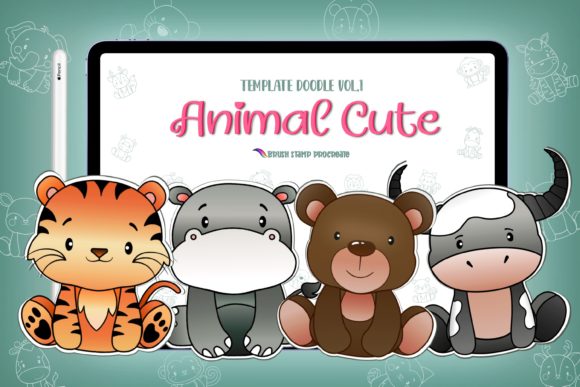
Evaluating Procreate Animal Cute Characters Brushes for Digital Design and Print Projects
Digital illustration has evolved from a niche hobby into a viable professional pathway, particularly for creators focusing on stationery, planners, and greeting cards. Within this ecosystem, the choice of tools significantly impacts workflow efficiency and the final aesthetic quality of a project. For artists using the iPad ecosystem, Procreate Animal Cute Characters Brushes represent a specific category of asset designed to streamline the creation of whimsical, character-driven artwork. Unlike standard painting brushes that simulate media like watercolor or oil, these assets function primarily as stamping tools, offering pre-designed elements that can be mixed, matched, and customized. Understanding where these tools fit within a broader design strategy is essential for adults looking to optimize their creative output without compromising on originality.
Defining the Asset: Stamps Versus Traditional Brushes
To make an informed decision about incorporating Procreate Animal Cute Characters Brushes into your library, it is crucial to distinguish between traditional drawing brushes and stamp brushes. A standard brush in Procreate responds to pressure, tilt, and speed, creating unique strokes every time. In contrast, the animal character sets described in this overview operate as stamps. When you tap the screen, a pre-rendered image—such as a cute bear, a rabbit, or a fox—appears instantly.
The distinct advantage of this format lies in consistency and speed. For professionals producing planner inserts, sticker sheets, or packaging designs, maintaining a consistent character style across dozens of pages can be time-consuming if drawn from scratch. These brush sets typically include around 21 element stamps, allowing users to mix and match features or entire characters rapidly. Furthermore, because these stamps often come with transparent backgrounds, they offer significant flexibility. Users can place them over custom textures, change their hue using Procreate's adjustment tools, or integrate them into complex compositions without worrying about jagged edges or background cleanup.
Comparative Analysis: Custom Illustration vs. Pre-Made Assets
When evaluating resources for digital projects, creators often face a trade-off between total creative control and production efficiency. Drawing every animal character from scratch provides unlimited freedom but demands a high level of illustrative skill and a significant time investment. On the other hand, utilizing Procreate Animal Cute Characters Brushes shifts the workflow from creation to curation and composition.
This approach is particularly beneficial for graphic designers who may excel in layout and typography but lack confidence in character illustration. By using high-quality stamp brushes, a designer can produce professional-grade greeting cards or blog buttons that feel handmade without needing to master anatomy or fur rendering. However, there is a limitation to consider: reliance on pre-made assets can sometimes lead to a generic look if the elements are not sufficiently modified. The most successful users of these brushes treat them as a foundation rather than a finished product. They might recolor the stamps, add hand-drawn doodles around them, or combine them with other textures to create a unique visual identity that distinguishes their work from others using the same set.
Ideal Use Cases and Practical Applications
The versatility of digital stamp brushes extends far beyond simple digital paintings. Because the files are provided as an instant digital download (usually in a .zip format), they bridge the gap between digital creation and physical production. Here are several scenarios where these tools prove most effective:
- Planner Inserts and Stickers: The "cute" aesthetic is a dominant trend in the planner community. These brushes allow creators to generate cohesive sticker sheets for digital planners (like GoodNotes) or printable vinyl stickers. The ability to tap and place characters quickly makes iterating through different layout options effortless.
- Stationery and Greeting Cards: For small business owners selling on platforms like Etsy, turnaround time is critical. Using animal character stamps can accelerate the design process for birthday cards, thank-you notes, and holiday ornaments, allowing for faster inventory turnover.
- Packaging and Branding: Small batch products, such as handmade soaps or baked goods, often benefit from charming, illustrative labels. These brushes can be used to create logos or decorative elements for packaging that convey a friendly, approachable brand voice.
- Educational Materials: The clear, distinct lines of cute animal characters make them suitable for coloring books or educational flashcards for children. Teachers and content creators can assemble these resources rapidly without needing advanced illustration skills.
Technical Requirements and Compatibility Considerations
Before purchasing or downloading any digital brush set, verifying hardware and software compatibility is a necessary step in the evaluation process. Procreate Animal Cute Characters Brushes are specifically engineered for the Procreate app on iPad. This necessitates owning an iPad (preferably an iPad Pro or Air for optimal performance) and, in most cases, an Apple Pencil or a compatible stylus that supports pressure sensitivity. While the stamping action itself only requires a finger tap, having a pressure-sensitive stylus is vital if you intend to modify the stamps or draw additional details around them.
Additionally, the delivery method involves a .zip file. Users must have a mechanism to unzip this file, which is native to newer versions of iPadOS via the Files app, or requires third-party software on older devices or computers. Once unzipped, the installation process involves importing the .brushset file directly into Procreate. It is important to note that these assets are not compatible with desktop-based software like Adobe Photoshop or Illustrator unless the user exports the individual stamps as PNG images first. Therefore, if your primary workflow exists entirely on a desktop computer, this specific brush format may not be the most efficient choice compared to purchasing a standalone clipart pack in vector or high-resolution raster formats.
Limitations and Decision Factors
While the convenience of Procreate Animal Cute Characters Brushes is evident, they are not a universal solution for every project. One significant limitation is the fixed resolution of stamp brushes. Unlike vector graphics, which can be scaled infinitely without loss of quality, raster-based brushes have a maximum size limit. If you attempt to scale a stamped character up too large, it may become pixelated. This makes them less suitable for large-format printing, such as billboards or large wall murals, unless the original source files are exceptionally high-resolution.
Furthermore, licensing terms should always be reviewed carefully. Most handmade digital downloads come with specific usage rights. Some creators allow for unlimited commercial use, while others may restrict the number of physical items sold or prohibit the resale of the digital files themselves. For professionals building a business, ensuring that the license aligns with commercial goals is just as important as the artistic style.
Another factor to weigh is the learning curve associated with digital layering. To get the most out of these transparent stamps, users need a basic understanding of how layers work in Procreate. Placing a character on a separate layer allows for non-destructive editing, such as changing colors or adding shadows, which is essential for creating depth and avoiding a "flat" look.
Making the Right Choice for Your Workflow
Ultimately, deciding whether to integrate Procreate Animal Cute Characters Brushes into your toolkit depends on your specific goals and current skill set. If you are a busy entrepreneur looking to expand your product line of planners and stationery quickly, these tools offer a high return on investment by drastically reducing design time. They are also an excellent resource for hobbyists who want to create personalized gifts, such as photo cards or T-shirt designs, without spending weeks learning to draw.
However, if your goal is to develop a highly unique, signature artistic style that relies on organic, hand-drawn imperfections, you might find pre-made stamps too restrictive. In such cases, using these brushes as a starting point for tracing or reference, rather than final elements, might be a more balanced approach. Similarly, if you work primarily in vector environments for scalability, investing in vector clipart alternatives might serve your long-term needs better.
In conclusion, these brush sets represent a practical middle ground between pure illustration and graphic assembly. They empower users to produce charming, professional-looking visuals with minimal technical barrier, provided the limitations regarding resolution and platform compatibility are understood. By assessing your project requirements, hardware capabilities, and desired level of customization, you can determine if this digital resource is the right fit for your creative journey.