Evaluating the 33 Splashes Illustrator Brushes for Professional Design Workflows
In the realm of digital illustration and graphic design, achieving an organic, hand-crafted aesthetic often requires more than just standard vector shapes. While clean lines and geometric precision have their place, many projects demand texture, imperfection, and a sense of movement that only fluid media can provide. This is where specialized asset packs become essential tools rather than mere shortcuts. The 33 Splashes Illustrator Brushes collection represents a focused resource designed to bridge the gap between rigid vector graphics and the chaotic beauty of real-world paint, ink, and spray. For designers working within Adobe Illustrator, understanding the utility and limitations of such a pack is crucial for integrating it effectively into a professional workflow.
The Composition and Technical Structure of the Pack
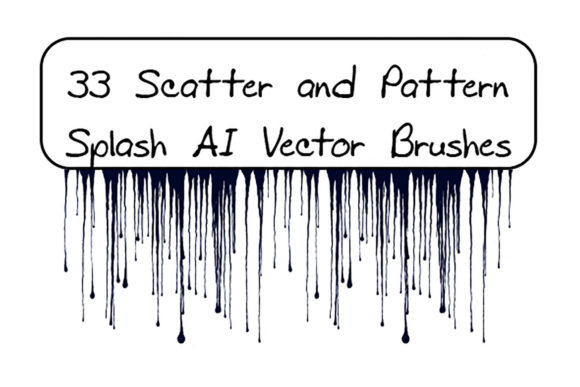
At its core, this asset library is divided into two distinct functional categories: scatter brushes and pattern brushes. The collection includes 19 scatter splashes, which encompass stains, drops, sprays, spots, splatters, blurs, and blots. These are engineered to be applied as individual instances or scattered along a path, offering immediate texture without the need for manual drawing. Complementing these are 14 pattern dripping vector brushes, specifically designed to create continuous flows, runs, and drips that follow the curvature of a stroke.
From a technical standpoint, the inclusion of both Ai Illustrator 10 and EPS 10 original files ensures broad compatibility. While modern creatives often work with the latest software versions, the ability to access source files from older iterations like CS6 or even Illustrator 10 is a significant advantage for agencies managing legacy projects or freelancers collaborating with clients who may not have updated their suites recently. The total archive size of 4.20 MB indicates that the vectors are optimized; they are detailed enough to hold up under scrutiny but efficient enough not to bog down complex documents with unnecessary anchor points.
Practical Application in Real-World Projects
The primary value of the 33 Splashes Illustrator Brushes lies in their versatility across various design disciplines. For a marketer creating a promotional flyer for a music festival, the scatter brushes can instantly add a grunge overlay that suggests energy and rebellion. Similarly, a book cover designer working on a thriller novel might utilize the dripping pattern brushes to simulate blood or rain, adding a narrative layer to the visual composition without needing to rasterize elements or switch to Photoshop.
One of the most practical aspects of this toolset is the ease of customization. Because these are vector-based, every splash, spot, and blotch retains its scalability. A user can change the color, size, or thickness of any element with a few clicks, ensuring consistency with brand guidelines or specific artistic palettes. Unlike raster textures, which can pixelate when enlarged, these brushes maintain crisp edges regardless of the output size, making them suitable for everything from small social media graphics to large-format print banners.
Furthermore, the included PDF help file with screenshots serves as a vital onboarding tool. For those less familiar with the nuances of the Brush panel in Illustrator, having visual guidance on how to load, apply, and modify these assets reduces the learning curve. It transforms the download from a simple file transfer into an educational resource, helping users understand not just how to use the brushes, but how to integrate them into their existing creative processes.
Flexibility and Creative Control
A common concern with pre-made brush sets is the feeling of uniformity—that everyone using the pack will produce identical results. However, the 33 Splashes Illustrator Brushes are designed with flexibility in mind. The documentation notes that users can make any brush for themselves in their specific Illustrator version. This openness encourages modification. A professional illustrator might take a standard drip pattern and adjust the spacing or rotation settings to create a unique variation that fits a specific project's mood.
The distinction between the scatter and pattern brushes allows for layered complexity. A designer might lay down a base of fine spray using the scatter brushes to create a textured background, then overlay bold, thick drips using the pattern brushes to draw the viewer's eye to specific focal points. This layering capability mimics traditional painting techniques, allowing for depth and dimensionality that flat vector art often lacks. The ability to toggle opacity and blending modes within Illustrator further expands the creative possibilities, enabling subtle watercolor effects or harsh, high-contrast ink looks.
Who Benefits Most from This Asset Collection?
This collection is particularly well-suited for freelancers and small business owners who need to produce high-quality visual content quickly without sacrificing artistic integrity. For a blogger or content creator looking to differentiate their headers and featured images, these brushes offer a way to break away from generic stock photography. Educators creating engaging presentation materials can also benefit, using the splashes and spots to highlight key information or add a playful, dynamic element to educational slides.
Additionally, publishers and marketers working on campaigns that require a "human touch" will find significant value here. In an era where digital perfection can sometimes feel sterile, the intentional imperfection of grunge patterns and splatters can evoke emotion and authenticity. Whether it is for a streetwear brand lookbook or a craft beer label, the aesthetic provided by these brushes aligns well with industries that prize raw, unpolished creativity.
Quality, Usability, and Long-Term Value
When evaluating the quality of the 33 Splashes Illustrator Brushes, the focus should be on the cleanliness of the vector paths. High-quality brushes should not introduce excessive anchor points that slow down rendering or cause printing issues. Based on the specification of EPS 10 compatibility, the geometry appears to be constructed with efficiency in mind. The separation into 19 scatter and 14 pattern brushes provides a balanced toolkit; it is comprehensive enough to handle diverse tasks but curated enough to avoid overwhelming the user with redundant options.
The long-term value of this pack is reinforced by its adaptability. As design trends shift from flat design back toward more textured, illustrative styles, having a reliable library of vector splashes ensures that a designer remains agile. The fact that the files are editable means the asset does not become obsolete; it evolves with the user's skill level. A beginner might use them out of the box, while an advanced user might deconstruct them to build entirely new custom brushes, extending the utility of the initial purchase indefinitely.
Limitations and Considerations
While highly useful, it is important to approach these brushes with realistic expectations. They are decorative tools, not standalone solutions. Overusing splatter effects can clutter a design and reduce readability, particularly in corporate or minimalist contexts. The effectiveness of the 33 Splashes Illustrator Brushes depends heavily on the restraint and artistic judgment of the user. Additionally, while the compatibility is broad, users on very old systems should verify that their specific version of Illustrator handles EPS 10 files correctly, although this is rarely an issue in modern environments.
Another consideration is the style specificity. The "grunge" and "drip" aesthetic is distinct. If a project requires a clean, corporate, or futuristic look, these brushes may not be appropriate. They excel in contexts that call for energy, decay, fluidity, or artistic expression. Understanding the stylistic boundaries of the pack is key to deploying it effectively.
Final Thoughts on Integration
In conclusion, the 33 Splashes Illustrator Brushes offer a robust solution for designers seeking to inject organic texture into their vector workflows. The combination of scatter and pattern brushes covers a wide range of textural needs, from subtle stains to dramatic drips. The inclusion of source files and clear documentation adds a layer of professionalism that supports both novice and experienced users.
For professionals aged 20 to 50 who navigate the demands of client work, personal branding, and creative exploration, this pack represents a practical investment. It saves time on manual texturing while providing the flexibility to customize outcomes. By understanding its strengths in scalability and editing, and respecting its stylistic niche, creators can leverage these tools to elevate the visual impact of their artwork. Whether used for a quick social media graphic or a complex illustration, these brushes serve as a reliable component in a well-stocked digital toolbox.