Integrating Watercolor Floral Brushes for Photoshop into Professional Creative Workflows
In the modern digital design landscape, efficiency and aesthetic consistency are paramount. Whether you are a freelance graphic designer managing tight deadlines for wedding stationery, a small business owner creating social media assets, or a hobbyist looking to elevate your digital scrapbooking, the tools you choose define the quality of your output. Watercolor Floral Brushes for Photoshop represent more than just a collection of digital stamps; they are a strategic asset designed to streamline the creative process while maintaining an organic, hand-painted feel that is often difficult to replicate with standard vector tools.
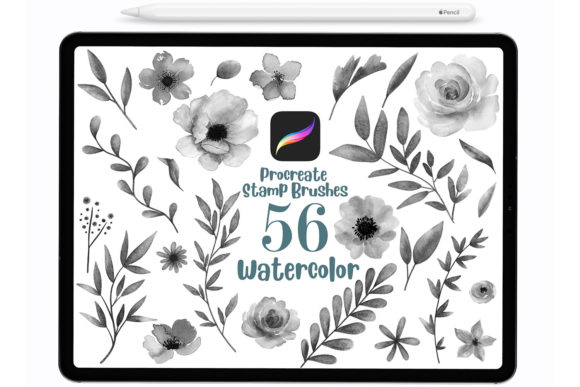
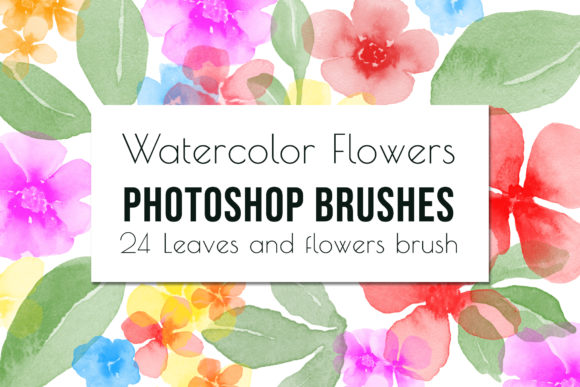
This set of 24 hand-painted floral watercolor brushes serves as a bridge between traditional artistry and digital precision. By understanding how to integrate these resources into your existing workflow, you can significantly reduce production time without sacrificing the unique texture and depth that clients and audiences crave. The following guide explores the practical implementation of these brushes, focusing on preparation, execution, and long-term utility within various professional contexts.
Understanding the Asset: Beyond Simple Stamps
At their core, these digital brushes are high-resolution scans of actual watercolor paintings, converted into functional Adobe Photoshop tools. Unlike generic clip art that sits statically on a layer, these Photoshop floral stamps interact with your canvas dynamically. When you apply a stroke, the software interprets pressure, opacity, and flow settings to mimic the behavior of real paint on paper. This distinction is crucial for professionals who need to create custom compositions rather than simply pasting pre-made images.
The set includes a diverse menu of brush types, ranging from delicate petals to robust leaves, allowing for the construction of complex botanical arrangements. Because these are created specifically for Adobe Photoshop CC, they leverage the engine's advanced brush dynamics. This means they are not merely "stickers" but flexible components that can be rotated, resized, recolored, and layered to create infinite variations. For a marketer or educator creating visual content, this flexibility ensures that no two projects look identical, preserving brand uniqueness across different campaigns.
Pre-Production: Preparation and Compatibility
Successful integration begins before you even open the brush file. A common pitfall for users is assuming digital assets work universally across all software platforms. It is important to note that these files are optimized exclusively for Photoshop. Attempting to load them into other raster or vector programs may result in compatibility errors or loss of texture fidelity. Therefore, the first step in your workflow is verifying your environment.
To ensure smooth operation, you must have a working knowledge of how to use Photoshop brushes. If your team includes junior designers or if you are returning to the software after a hiatus, reviewing the basics of the Brush Panel and Preset Manager is a necessary preparatory task. Since this is a digital file with no physical component, immediate access is granted upon download, but organization is key. Store the watercolor_brushes.abr file in a dedicated cloud-synced folder or a version-controlled asset library. This prevents data loss and ensures that if you switch computers or collaborate with others, the resource is always available.
Installation is straightforward but should be treated as a standardized procedure in your studio. You can drop the .abr file directly into your Photoshop brushes folder or load it via Edit > Presets > Preset Manager. Once loaded, these brushes become part of your active toolkit. A pro tip for efficiency is to save this specific set as a distinct tool preset group. This allows you to swap between your technical inking brushes and these artistic floral tools instantly, keeping your mental focus on creation rather than navigation.
Execution: Workflow Integration and Application
Once installed, the real value of Watercolor Floral Brushes for Photoshop emerges during the creation phase. These tools fit seamlessly into various stages of a project, whether you are building a composition from scratch or embellishing an existing layout.
Wedding Stationery and Event Design
For entrepreneurs specializing in wedding invitations or event branding, time is often the most scarce resource. Using these brushes allows for the rapid prototyping of floral borders and corner accents. Instead of searching through stock photo sites for the perfect flower arrangement—which often requires expensive licenses and extensive masking—you can paint your own directly onto the invitation mockup. Because the brushes allow you to choose any color, you can match the couple's specific palette instantly. This capability transforms the design process from a search-and-replace mission into a direct creative act, enabling faster client approvals and revisions.
Digital Marketing and Social Media
Content creators and marketers frequently need to produce high volumes of visually engaging posts. Flat design has its place, but there is a growing trend toward textured, organic visuals that stand out in a crowded feed. These flowers and leaves Photoshop brushes can be used to create custom backgrounds or subtle overlays that add depth to promotional graphics. By adjusting the layer opacity and blending modes (such as Multiply or Overlay), you can integrate the watercolor texture so it feels like part of the paper rather than an object sitting on top. This technique enhances perceived value and engagement.
Scrapbooking and Personal Projects
For hobbyists and digital scrapbookers, the workflow shifts from client delivery to personal expression. The ability to layer these brush stamps allows for the creation of intricate clusters that tell a story. You might start with a base leaf shape, add a bloom on a lower opacity layer, and finish with fine details using a smaller brush size from the set. This layering approach mimics traditional painting techniques, giving digital pages a tactile quality that resonates emotionally with viewers.
Optimizing Quality and Consistency
Maintaining high standards when using digital brushes requires attention to resolution and color management. Since these brushes were created in Photoshop CC, they are optimized for high-DPI workflows. When designing for print, such as wall art or physical cards, ensure your document is set to at least 300 DPI. Using these brushes on a low-resolution canvas can result in pixelation, undermining the soft, fluid nature of the watercolor effect.
Color consistency is another critical factor. While the brushes allow you to select any foreground color, remember that watercolor relies on transparency. If you pick a fully opaque black, you may lose the nuanced variation that makes the brush look like paint. Instead, sample colors from a curated palette or use the Color Dynamics settings in the Brush Panel to introduce slight hue variations within a single stroke. This small adjustment adds realism and prevents the artwork from looking too "digital" or repetitive.
Furthermore, organize your layers logically. When constructing a complex floral arrangement, name your layers descriptively (e.g., "Base Leaves," "Primary Bloom," "Accent Petals"). This practice is essential for long-term usability. If a client requests a change three months later, or if you need to adapt the design for a different format, a well-organized file allows you to isolate and modify specific elements without starting over.
Long-Term Value and Scalability
Investing in a specialized toolset like this yields compounding returns over time. As you become proficient with the specific behaviors of these 24 brushes, your speed increases. What once took an hour to illustrate manually can be achieved in minutes, allowing you to take on more projects or dedicate more time to high-level conceptual thinking. For agencies and publishers, standardizing on a specific brush set across the team can also help establish a recognizable house style, ensuring brand consistency across all outputs.
It is also worth considering how these assets interact with other tools in your ecosystem. While they are native to Photoshop, finished elements can be exported as PNGs with transparent backgrounds for use in layout software like InDesign or presentation tools like PowerPoint. This interoperability extends the life of the brushes beyond the initial creation phase, making them a versatile component of a broader design infrastructure.
In conclusion, Watercolor Floral Brushes for Photoshop are not merely a decorative addition but a functional instrument for efficient, high-quality design. By respecting the technical requirements, organizing your workflow, and applying these tools with an understanding of their dynamic capabilities, you can transform your creative output. Whether you are crafting elegant wedding suites, engaging marketing materials, or personal art, these brushes provide the necessary foundation to execute your vision with professionalism and artistic flair.