Elevating Digital Design with Vector Snowflake Brushes for Adobe Illustrator
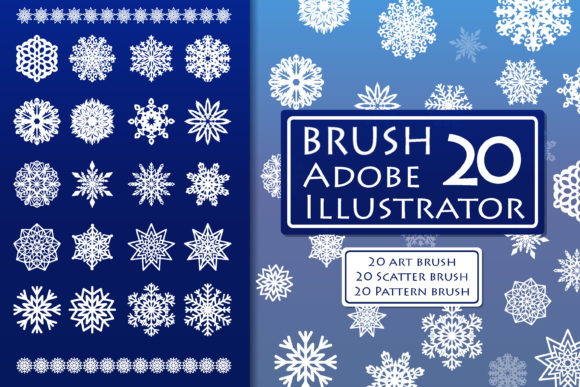
The intersection of seasonal aesthetics and professional graphic design often hinges on the efficiency of the tools available to the creator. When winter themes are required for a project, the difference between a generic, pixelated image and a crisp, scalable design lies in the underlying technology. Vector Snowflake Brushes represent a specialized category of digital assets designed to bridge this gap, offering designers a robust method for integrating complex winter motifs into their work without sacrificing quality or flexibility. This collection, comprising a set of art, pattern, and scatter snowflake brushes, provides a comprehensive toolkit for Adobe Illustrator users ranging from hobbyists to brand strategists.
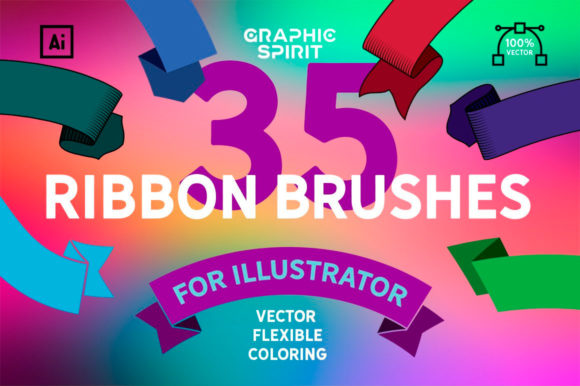
At the core of this utility is the versatility inherent in vector graphics. Unlike raster images, which degrade when enlarged, vector-based brushes allow for infinite scalability. The specific set in question includes 20 flexible, customizable brushes contained within a single file for Adobe Illustrator CC, alongside an AI10 file for compatibility with earlier versions of the software. Furthermore, the inclusion of an EPS 10 format ensures that these design elements can be utilized across various vector programs, extending their reach beyond the Adobe ecosystem. This multi-format approach underscores the importance of accessibility in modern design workflows, ensuring that creators are not limited by their software version or preferred platform.
The Mechanics of Art, Pattern, and Scatter Brushes
To fully leverage these tools, one must understand the distinct behaviors of the three brush types included: art, pattern, and scatter. Each serves a unique function in the construction of a winter-themed composition.
Art brushes stretch a defined shape along the length of a path. In the context of snowflakes, this allows a designer to draw a continuous line that transforms instantly into a delicate trail of ice crystals or a connected chain of frost. This is particularly useful for creating borders, framing devices, or flowing ribbons of snow that guide the viewer's eye across a layout. Because these are vector-based, the thickness and curvature of the path can be adjusted post-application, allowing for dynamic reshaping without losing the integrity of the snowflake details.
Pattern brushes, conversely, repeat a defined segment along a path. These are ideal for creating seamless borders or repetitive decorative elements where consistency is key. When applied to a rectangle or a circle, a pattern brush ensures that the snowflake motif aligns perfectly at the corners and along the edges, solving a common alignment headache that manual placement often incurs. This automation speeds up the decoration of invitations, business cards, and packaging where uniformity reflects professionalism.
Scatter brushes distribute copies of the snowflake artwork randomly along a path or within a defined area. This mimics the natural, chaotic fall of snow. By adjusting the size, spacing, rotation, and scatter parameters within the brush options, a designer can simulate anything from a gentle flurry to a heavy blizzard. The ability to randomize these elements prevents the "stamped" look that often plagues amateur designs, adding a layer of organic realism to digital illustrations.
Customization and Editability
The true power of this Vector Snowflake Brushes set lies in its adjustability. Once a path is drawn and a brush is applied, the result is not a static image but a live, editable object. Designers can easily change the shape, size, or color of the stroke. For instance, a thick, bold snowflake border intended for a poster can be thinned down for a subtle watermark on a letterhead simply by adjusting the stroke weight. Similarly, the color palette can be shifted instantly to match brand guidelines; a traditional white snowflake can be changed to a metallic silver, a deep navy, or a vibrant holiday red with a single click.
This level of control is essential for iterative design processes. Clients often request modifications late in the production cycle. With raster assets, changing the color or scale might require returning to the source file or accepting a loss in quality. With these Illustrator art brushes, the workflow remains fluid. The brushes are adjustable in size and shape via Adobe Illustrator's native interface, meaning the designer retains full command over the aesthetic outcome throughout the project lifecycle.
Diverse Applications Across Industries
The utility of these brushes extends far beyond simple holiday greetings. Their application spans a wide variety of projects, proving their value to a broad audience including professionals, consumers, creators, educators, and business owners.
- Branding and Logos: For businesses launching winter promotions or those with cold-climate identities, these brushes offer a way to create unique logo variations. A coffee shop might use a scatter brush to create a frothy, snowy texture around their winter cup design, while a logistics company could use an art brush to create a sleek, icy trajectory line in their seasonal advertising.
- Packaging and Product Design: The high-resolution nature of vector art makes it ideal for print production. Whether decorating pillows, covers, or product boxes, the crisp lines of vector snowflakes ensure that the final print is sharp, regardless of the physical size of the item. The EPS 10 format further facilitates this by allowing the designs to be imported into specialized packaging software.
- Apparel and Merchandise: T-shirt designers frequently rely on scalable vectors to ensure that prints look good on both a small chest logo and a large back graphic. These brushes allow for the rapid creation of complex patterns that would be time-consuming to draw by hand, enabling quick turnaround times for seasonal merchandise.
- Editorial and Publishing: Magazine layouts, book covers, and posters benefit from the decorative potential of pattern and scatter brushes. They can be used to create subtle background textures that add depth to a page without overwhelming the text, or as bold focal points in headline typography.
- Event Stationery: From wedding invitations to corporate gala invites, the elegance of a custom-drawn snowflake border elevates the perceived value of the event. The ability to customize the density and style of the snow allows the stationery to match the specific tone of the occasion, be it whimsical or formal.
Technical Considerations and Compatibility
While the benefits are numerous, successful implementation requires attention to technical requirements. It is crucial to note that all brushes in this set are designed specifically for Adobe Illustrator, not Photoshop. While Photoshop does support some brush functionalities, the vector editing capabilities described—such as stretching art along a path while maintaining editability—are native to Illustrator's architecture. Attempting to use these files in raster-based programs may result in a loss of the very features that make them valuable.
The system requirements specify Adobe Illustrator CC or newer for the primary file, ensuring access to the latest brush engine improvements. However, the inclusion of an AI10 file demonstrates a commitment to inclusivity, accommodating users who may be operating on older, stable versions of the software due to hardware limitations or institutional policies. Additionally, the provision of the EPS 10 file acts as a universal bridge. EPS (Encapsulated PostScript) is a longstanding standard in the graphics industry, allowing these vector elements to be placed in other vector programs such as CorelDRAW or Inkscape, albeit with potentially limited brush interactivity compared to the native Illustrator environment.
Workflow Efficiency and Creative Freedom
In a professional setting, time is a critical resource. The process of drawing intricate snowflakes manually for every project is inefficient and often yields inconsistent results. By utilizing a pre-made set of 20 flexible brushes, designers can bypass the tedious creation phase and move directly to composition and refinement. This shift allows more mental energy to be devoted to layout, color theory, and messaging—the aspects of design that truly communicate with the audience.
Moreover, the "instant result" capability fosters experimentation. A designer can rapidly test twenty different variations of a border or background in the time it would take to sketch one. This rapid prototyping leads to better creative outcomes, as the designer is not constrained by the effort required to produce the assets. The ability to easily edit, change shape, size, or color encourages a playful exploration of possibilities that might otherwise be discarded due to time constraints.
For educators and researchers, these tools serve as excellent examples of how vector mathematics can be applied to artistic expression. They demonstrate the power of algorithmic distribution (in the case of scatter brushes) and path deformation (in art brushes), providing a tangible link between technical software functions and visual art.
Maintaining Quality in Production
When preparing files for print, the vector nature of these brushes ensures that there are no resolution issues. Whether the output is a massive billboard or a tiny business card, the mathematical curves defining the snowflakes remain smooth. This is a significant advantage over downloading free PNG snowflake packs from the internet, which often appear jagged or blurry when scaled up. For business owners managing their own marketing materials, this guarantees a polished, professional appearance that reinforces brand credibility.
It is also worth noting the organizational benefit of having all 20 brushes in one file. Managing multiple library files can clutter a workspace and slow down the loading of assets. A consolidated library streamlines the setup process, allowing the designer to open the file, load the brushes into their panel, and begin working immediately. This simplicity reduces friction in the creative workflow, making the tool accessible even to those who may not be advanced power users.
Conclusion on Utility and Value
The integration of Vector Snowflake Brushes into a design workflow represents a strategic choice for quality and efficiency. By combining the scalability of vector graphics with the automation of Illustrator's brush engine, this set empowers users to create sophisticated winter-themed designs with ease. The diversity of the included brushes—art, pattern, and scatter—covers a wide spectrum of decorative needs, from structured borders to organic atmospheric effects.
Whether the goal is to decorate a pillow, design a logo, or illustrate a children's book, the flexibility to adjust size, shape, and color ensures that the final output is tailored precisely to the project's requirements. The support for multiple file formats (CC, AI10, EPS 10) further cements the utility of this collection, making it a versatile asset for a global audience of creators. As the demand for high-quality, adaptable digital assets continues to grow, tools that balance ease of use with professional-grade output will remain indispensable in the toolkit of the modern designer.
For those ready to enhance their winter projects, ensuring the correct software environment is the first step. Users should verify they have Adobe Illustrator CC or a compatible version installed to unlock the full potential of these adjustable art brushes. With the right tools and a clear understanding of their capabilities, the creation of stunning, seasonally appropriate visuals becomes a seamless and enjoyable part of the design process.