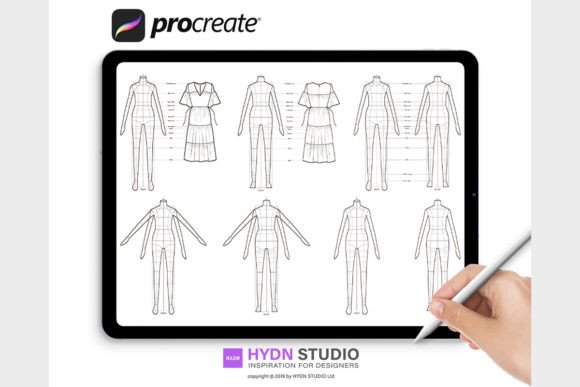
Mastering Fashion Illustration with High-Quality Flat Body Procreate Stamp Brushes
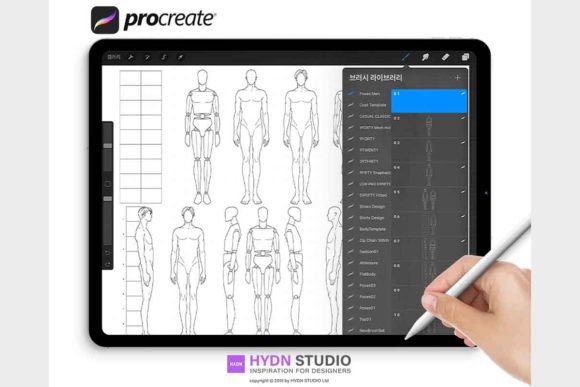
The landscape of digital fashion design has shifted dramatically in recent years, moving from complex vector software on desktops to intuitive, tactile experiences on tablets. At the heart of this revolution is Procreate, an application that has become indispensable for illustrators, designers, and hobbyists alike. Within this ecosystem, specific tools have emerged to streamline the most repetitive yet critical aspects of the workflow: drawing the human form. Fashion Flat Body Procreate Stamp Brushes represent a significant leap forward in efficiency, allowing creators to bypass the initial sketching phase and focus immediately on garment construction, fabric rendering, and stylistic expression. These tools are not merely shortcuts; they are foundational assets that ensure every single line remains clear, easy to manipulate, and professionally consistent.
The Strategic Advantage of Pre-Defined Croquis
In traditional fashion illustration, whether using watercolor or ink, a significant portion of time is dedicated to drawing the "croquis," or the underlying figure. Achieving correct proportions, dynamic poses, and consistent anatomy requires years of practice. Even for seasoned professionals, drawing the same body type repeatedly can lead to fatigue and slight variations that disrupt the cohesion of a collection. This is where Fashion Flat Body Stamps for Procreate change the paradigm. By utilizing high-quality stamp brushes, artists can insert a perfectly proportioned figure into their canvas instantly.
The primary advantage lies in consistency. When presenting a technical package or a cohesive lookbook to a client or manufacturer, uniformity in the figure's posture and proportions is essential. Using a standardized set of Procreate Stamp Brushes ensures that every garment is displayed on an identical frame, allowing the viewer to compare silhouettes and details without distraction. Furthermore, these stamps are optimized for clarity. Unlike low-resolution images that pixelate when scaled, professional brush sets are engineered to maintain crisp edges regardless of the canvas size, ensuring that the final output meets industry standards for print and digital presentation.
Technical Optimization and Line Quality
Not all digital assets are created equal. A common pitfall for users downloading free or low-quality resources is the lack of optimization within the Procreate environment. High-end Procreate Brushes designed for fashion flats undergo rigorous testing to ensure compatibility with the app's rendering engine. The distinction often lies in how the brush interacts with the pressure sensitivity of the Apple Pencil. While a stamp brush places a static image, the surrounding workflow—such as tracing over the stamp or adding texture to the fabric—relies heavily on the responsiveness of the toolset.
When utilizing Fashion Flat Body Procreate Stamp Brushes, the user benefits from vectors of information that are pre-calibrated for the iPad's display resolution. This optimization means that when you zoom in to add intricate stitching details or specific seam lines, the underlying guide remains sharp. There is no blurring or aliasing, which is crucial for technical drawings where precision dictates the manufacturability of the garment. The ability to work with "every single line clear and easy" transforms the iPad from a sketching toy into a legitimate production tool capable of handling the demands of professional fashion houses.
Diverse Applications Across the Industry
The utility of these digital stamps extends far beyond simple sketching. Different sectors of the fashion industry leverage these tools in unique ways:
- Designers and Brands: Rapidly iterate through multiple colorways and fabric prints on a single pose to visualize a full collection before sampling physical garments.
- Educators and Students: Focus curriculum on draping, textile knowledge, and construction techniques rather than spending weeks mastering human anatomy.
- Technical Designers: Create precise flat sketches for tech packs, ensuring that measurements and seam placements are accurate relative to a standard body block.
- Influencers and Content Creators: Produce high-volume visual content for social media platforms, maintaining a consistent aesthetic that builds brand recognition.
For researchers analyzing fashion trends, these tools allow for the quick digitization of historical silhouettes or the creation of comparative studies without the barrier of entry being artistic drawing skill. The democratization of high-quality illustration tools means that good ideas can be visualized effectively regardless of the creator's background in fine arts.
Workflow Integration and File Management
Integrating new tools into an existing workflow requires understanding the file structures involved. Professional brush sets typically come as a Brushset Procreate 5 file, often accompanied by a PDF document with installing instructions. This documentation is vital, as it often contains license agreements, usage rights, and specific tips for getting the most out of the stamps. The digital file types are standardized to ensure cross-platform compatibility during the transfer process, usually distributed within a compressed ZIP archive.
Once the assets are acquired, the installation process is straightforward but varies slightly depending on the user's hardware setup. Understanding How To Install Procreate Brush Sets correctly prevents common errors such as corrupted files or missing assets in the library. The core file extension to look for is .brushset. This specific format allows Procreate to recognize the file as a complete collection rather than individual brushes, installing them as a dedicated group at the top of the brush library for immediate access.
Step-by-Step Installation Protocols
To ensure a seamless setup, users should follow specific protocols based on their available devices. The process generally begins with decompressing the downloaded zip file. Once extracted, the .brushset file must be transferred to a cloud folder accessible by the iPad. Compatible services include Google Drive, One Drive, Dropbox, and iCloud. This cloud-based approach ensures that the file integrity is maintained during transfer.
01. Add Brush Set on Mac
For users operating within the Apple ecosystem with a Mac running MacOS 10.11 or later, the most efficient method is AirDrop. By selecting the brush set file on the computer and choosing the iPad as the destination, the system handles the transfer and installation automatically. This method is highly recommended as it ensures that all sets of brushes are sent and installed at once, minimizing the risk of file corruption that can occur with manual downloads. Upon completion, a notification usually appears on the iPad confirming the import.
02. Add Brush Set from iPad
For those working exclusively on the tablet, the process involves navigating the cloud storage apps directly. From the iPad, open the Google Drive, One Drive, Dropbox, or iCloud app and locate the folder containing the brush set. Select the specific .brushset file. Depending on the app interface, click the small "..." icon or the share button and select "Export" or "Open In." Choose "Open in Procreate" from the list of applications. When Procreate launches, the new set of brushes will appear at the very top of the brush library, ready for use.
03. Alternative Import Methods
In scenarios where cloud storage is unavailable, users can utilize the "Files" app on the iPad if the brush set has been saved locally via Safari or email. Tapping the .brushset file within the Files app will trigger the same automatic import sequence in Procreate. It is important to note that dragging and dropping the file directly into the Procreate brush panel is also a supported feature in newer versions of the software, offering yet another layer of flexibility for power users managing large libraries of Procreate Stamps.
Maximizing Creative Potential
Once installed, the true potential of Fashion Flat Body Stamps for Procreate is unlocked through layer management and blending modes. Because these stamps are essentially high-fidelity guides, they should typically reside on a lower opacity layer or a separate layer group that can be toggled on and off. This allows the artist to trace over the form with custom colors or to use the stamp as a mask for clipping fabric textures.
The versatility of these tools encourages experimentation. A designer might use a standard standing pose to draft a formal gown, then switch to a dynamic walking pose from the same set to show how the fabric moves. The consistency of the body type ensures that the comparison is valid, while the variety of poses adds life to the presentation. Moreover, because these are digital assets, they can be flipped, rotated, and scaled without any loss of quality, providing infinite compositional possibilities from a single purchase.
In the broader context of digital art, the adoption of specialized stamp brushes signifies a maturation of the medium. It acknowledges that in professional environments, time is a resource as valuable as talent. By automating the foundational elements of fashion illustration, creators can dedicate more energy to what truly differentiates their work: the design itself. Whether for a student learning the ropes of garment construction or a veteran designer pitching a new line, Fashion Flat Body Procreate Stamp Brushes offer a reliable, high-quality foundation upon which great fashion stories are built.