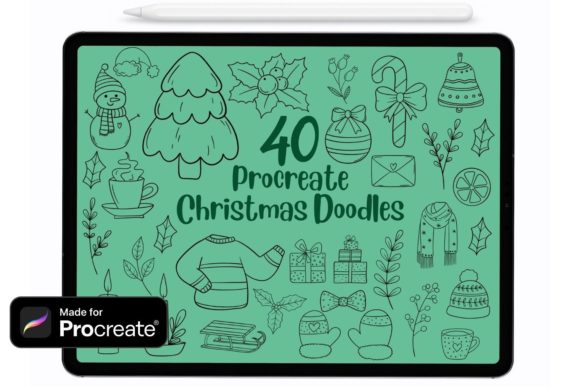
Unlocking Holiday Creativity with Procreate Christmas Doodle Stamp Brushes
The holiday season brings a unique pressure to create. Whether you are designing greeting cards for clients, crafting social media graphics for your small business, or simply trying to capture the festive spirit in your digital journal, the demand for high-quality, whimsical art spikes every December. This is where Procreate Christmas Doodle Stamp Brushes become an invaluable asset. Unlike standard drawing tools that require you to sketch every snowflake or holly leaf from scratch, this specialized set of 40 brushes offers instant, charming details that can transform a simple composition into a polished illustration. However, simply downloading a brush set does not guarantee professional results. Many creators, from beginners to seasoned freelancers, fall into traps regarding compatibility, workflow integration, and artistic application that can hinder their efficiency and the quality of their final output.
Understanding the True Value of Stamp Brushes
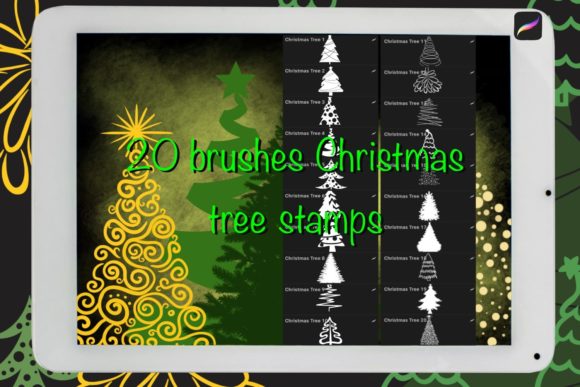
At their core, these Procreate stamps are pre-designed shapes—ranging from candy canes and ornaments to cozy sweaters and winter animals—that function as single-stroke elements. The primary appeal lies in speed and consistency. When you are working on a deadline for a marketing campaign or need to produce a series of wallpapers, hand-drawing repetitive elements is often impractical. These brushes allow you to populate a scene rapidly while maintaining a cohesive doodle aesthetic. They are perfect for making lovely illustrations, prints, and wallpapers because they provide a hand-crafted look without the hours of labor. Yet, a common misunderstanding is treating them as a shortcut that requires no artistic thought. Using them indiscriminately can lead to cluttered, generic-looking art that lacks personality.
Mistake One: Ignoring Version Compatibility and Import Methods
One of the most frustrating experiences for a creator is purchasing or downloading a tool only to find it doesn't work on their device. A frequent oversight involves software versions. These Procreate Christmas Doodle Stamp Brushes are compatible with Procreate version 4.1 and above. While many users have updated their apps, some professionals holding onto older iPads or those who have disabled automatic updates may encounter errors where the brushes fail to load or behave unpredictably. Before you begin your holiday project, always verify your app version in the settings menu.
Furthermore, the import process is often mishandled, leading users to believe the files are corrupted when they are simply in the wrong location. After downloading the files, do not try to open them directly from a email attachment preview or a compressed zip folder within the app. Instead, go to your Files app, locate the downloaded brush file, and double-tap it (or right-click and select "Open in Procreate"). It will automatically import into your brush library. Skipping this step or trying to drag and drop from unsupported sources wastes valuable time and creates unnecessary stress during a busy season.
Mistake Two: Neglecting Customization Options
A significant error many beginners make is using the brushes exactly as they appear out of the box. Because these are digital stamps, there is a temptation to use the default black outline and move on. This approach limits your creative potential and can make your artwork look disjointed if the default color doesn't match your palette. Remember, you can change the color, size, and opacity of these Procreate brushes just like any other tool.
To elevate your work, experiment with the opacity slider to create depth. A snowflake stamp at 100% opacity might look flat and pasted on, but reducing it to 60% can make it feel like it's falling gently in the background. Similarly, resizing the stamps allows you to create perspective; larger ornaments in the foreground and tiny ones in the distance add dimension to your scene. For entrepreneurs creating brand assets, matching the stroke color of these doodles to your specific brand hex codes is essential for maintaining professional consistency across all your holiday communications.
Mistake Three: Overlooking Input Method Nuances
While versatility is a selling point, not all input methods yield the same result. These brushes can be used with a third-party stylus, Apple Pencil, or even your finger. However, relying solely on your finger for detailed doodle work often leads to imprecise placement and a lack of control over the angle of the stamp. If you are creating intricate patterns for print-on-demand products, the Apple Pencil offers the pressure sensitivity and tilt recognition needed to place elements with surgical precision. Conversely, if you are sketching rough ideas or brainstorming concepts quickly, using your finger or a budget-friendly third-party stylus is perfectly acceptable and can speed up the ideation phase. The mistake lies in choosing the wrong tool for the specific stage of your workflow, which can either slow you down or compromise the quality of the final piece.
Strategic Application for Professionals and Hobbyists
For marketers and bloggers, the goal is often engagement. A wall of text rarely performs as well as visual content. Integrating these Procreate Christmas Set of 40 Procreate christmas doodle brushes into your headers, bullet points, or social media stories can increase dwell time and shareability. However, avoid the trap of over-decoration. Just because you have 40 different stamps doesn't mean you need to use all of them in one image. Clutter confuses the viewer. Select three or four complementary elements—perhaps a wreath, a star, and some snow—and use them consistently throughout a campaign to build a recognizable visual theme.
Educators and freelancers should also consider the licensing and usage rights if they intend to sell the final artwork. While the brushes themselves are tools, the artwork you create with them is yours. Ensure that your use of these stamps aligns with the terms of the creator who designed them, especially if you are incorporating them into logos or trademarks where uniqueness is critical. In such cases, modifying the stamps by combining them or drawing over them adds a layer of originality that protects your intellectual property.
Making the Right Choice for Your Workflow
Before committing to using this set for a major project, take a moment to test the brushes on a blank canvas. Check how they interact with different blend modes and textures. Do they look crisp on a dark background? How do they scale when enlarged significantly? This preliminary check prevents costly revisions later. By understanding the capabilities and limitations of your tools, you avoid the disappointment of mid-project discoveries that force you to start over.
Ultimately, the value of Procreate Christmas Doodle Stamp Brushes lies not just in the images they produce, but in the time they save and the creative doors they open. Whether you are a hobbyist looking to send personalized digital cards or a business owner aiming to capture the holiday market, avoiding these common pitfalls ensures your workflow remains smooth and your results remain stunning. Embrace the flexibility of the tool, respect the technical requirements, and let your creativity lead the way this season.