Master Fashion Illustration with Animal Skin Procreate Brushes
The moment your Apple Pencil touches the iPad screen, the texture of your digital stroke defines the entire mood of your illustration. For fashion designers and illustrators, finding the right tool to mimic organic materials like fur, leather, or exotic prints can often feel like a hunt for a needle in a haystack. This is where Animal Skin Procreate Brushes changes the workflow entirely. Instead of spending hours manually painting individual hairs or wrestling with complex layer masks to achieve a realistic texture, this versatile set offers an immediate solution. It is not just a collection of stamps; it is a diverse toolkit designed to elevate sketching and drawing across various styles of fashion illustration.
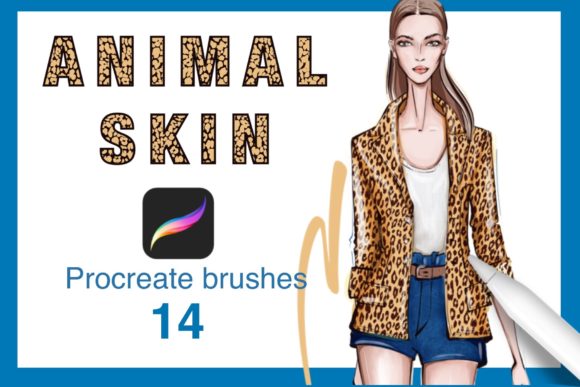
When you install these brushes, you are essentially adding a specialized textile lab to your digital arsenal. The set includes 14 distinct animal brushes, each engineered to respond naturally to pressure and tilt, mimicking the way real media interacts with paper. Whether you are drafting a quick concept for a winter coat or rendering a high-detail editorial piece, these tools allow you to start drawing immediately and get amazing results without a steep learning curve.
Why Texture Matters in Digital Fashion Design
In the competitive world of fashion design, the difference between a flat sketch and a compelling presentation often lies in the rendering of materials. Clients and art directors need to visualize not just the cut of a garment, but how the fabric feels. A mink collar needs to look soft and voluminous; a snakeskin boot needs to show scale and sheen. Generic round brushes simply cannot convey this tactile information effectively.
Animal Skin Procreate Brushes bridge the gap between technical flat sketches and emotive artistic renderings. By providing pre-configured textures that react to your hand movements, they allow you to focus on the design itself rather than the mechanics of creating the texture. This efficiency is crucial for professionals working under tight deadlines, such as freelancers pitching to brands or educators demonstrating techniques in a classroom setting.
Key Characteristics of the Brush Set
The strength of this collection lies in its diversity and ease of use. Rather than offering one generic "fur" brush, the set provides 14 specific variations. This allows for a nuanced approach to rendering different species and hair lengths. Key qualities include:
- Pressure Sensitivity: The brushes utilize Procreate's full pressure capabilities, allowing strokes to taper naturally from thick to thin, essential for drawing individual strands of hair or fine leather grain.
- Tilt Recognition: Many of the brushes respond to the angle of your Apple Pencil, letting you shade broad areas of fur or create directional lighting effects simply by tilting your hand.
- Streamlined Workflow: There is no need for complex settings adjustments. The brushes are optimized out of the box, meaning you can dive straight into creative work.
- Versatility: While designed for animal skins, these tools are equally effective for rendering fluffy knits, frayed denim, or abstract organic textures in mixed media projects.
Practical Applications Across Industries
The utility of Animal Skin Procreate Brushes extends far beyond simple hobbyist sketching. In professional environments, these tools serve specific functions that enhance productivity and communication.
For fashion entrepreneurs and brand owners, speed is currency. When developing a new collection featuring faux fur trims or exotic print accessories, being able to rapidly visualize these elements on an iPad Pro can accelerate the decision-making process. You can iterate through colorways and texture combinations in minutes, presenting polished concepts to manufacturers or investors without needing a physical sample first.
Educators and bloggers in the creative space will find these brushes invaluable for tutorial content. Demonstrating how to render realistic textures is often the most challenging part of teaching digital illustration. With a dedicated set of tools, instructors can clearly show students how to build up layers of fur or scale patterns, making complex techniques accessible to beginners. Similarly, publishers and marketers can use these assets to create eye-catching social media graphics or blog headers that stand out due to their rich, tactile appearance.
Enhancing Branding and Visual Communication
In marketing, texture evokes emotion. A luxury brand selling cashmere or alpaca products needs imagery that screams "softness." Using standard digital brushes often results in a plastic-looking finish that fails to convey premium quality. By integrating Animal Skin Procreate Brushes into your visual content strategy, you ensure that your digital assets retain an organic, high-end feel. This attention to detail strengthens brand identity and increases engagement, as viewers are more likely to stop scrolling when an image possesses depth and realism.
Consider a scenario where a freelance illustrator is commissioned to draw a series of portraits featuring subjects in vintage fur stoles. Without specialized tools, this project could take days to render convincingly. With this brush set, the artist can establish the base texture quickly, focusing their energy on lighting, composition, and facial features. The result is a higher quality output delivered in less time, directly impacting the freelancer's hourly rate and client satisfaction.
Making the Most of Your Digital Toolkit
While having powerful tools is advantageous, knowing how to implement them effectively is what separates amateurs from professionals. When using Animal Skin Procreate Brushes, consider the following practical recommendations to maximize their potential:
- Layer Management: Do not try to render everything on a single layer. Use separate layers for the base shape, the mid-tone texture, and the highlight strands. This non-destructive workflow allows you to adjust opacity and blending modes (like Multiply or Overlay) to integrate the texture seamlessly with the underlying garment color.
- Color Variation: Real animal skin is rarely one solid color. Utilize the brushes with a palette of varied tones. Drag and drop colors directly onto the canvas to test combinations, using the brush's natural scatter to blend them organically.
- Scale Appropriately: Remember that these brushes are vector-based or high-resolution raster stamps. Ensure you are working at a canvas resolution suitable for your final output (usually 300 DPI for print) so the texture remains crisp and does not appear pixelated when zoomed in.
- Combine Techniques: These brushes work best when combined with standard blending tools. Use a soft airbrush underneath to establish volume and shadow, then apply the animal skin brushes on top to define the surface detail.
Ultimately, the value of this set is found in its ability to remove technical barriers. It empowers creators to translate their vision onto the screen with fidelity and speed. Whether you are a seasoned illustrator looking to refresh your library or a business owner needing to visualize a product line, Animal Skin Procreate Brushes offers a reliable, high-quality solution. By installing this set, you are not just adding files to your app; you are upgrading your entire approach to digital texturing, ensuring that every stroke you make contributes to a more professional and engaging final piece.