Master Realistic Watercolours in Procreate
Digital art often struggles to capture the organic unpredictability of traditional media. There is a specific charm to watercolour—the way pigment pools, dries with soft edges, and interacts with the tooth of paper—that flat digital tools frequently miss. Procreate Watercolour Brushes bridge this gap effectively. These are not just standard smudge tools; they are hand-created digital assets designed to replicate the physics of wet paint on paper without the mess. Whether you are a professional illustrator looking to speed up your workflow or a hobbyist wanting to create printable stationery, understanding how to leverage these specific tools can transform your digital canvas into something that feels tactile and authentic.
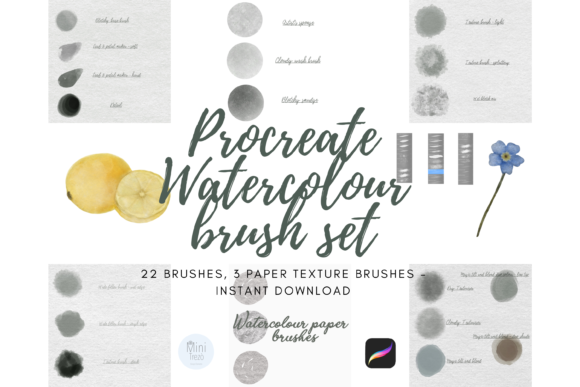
The core appeal of this brush pack lies in its versatility. Unlike rigid vector tools, these brushes allow for a spectrum of styles ranging from very watery, painterly washes to heavier, more saturated finishes. This flexibility means you aren't locked into a single aesthetic. You can build up layers for depth or keep things airy and light. The pack includes 22 unique individual digital brushes, but the real secret to their realism isn't just the paint application—it's the inclusion of three distinct watercolour paper styles built directly as brushes. This allows you to control the density and texture of the "paper" beneath your strokes, a detail often overlooked in digital painting that makes all the difference in perceived quality.
Unlocking Authentic Texture and Flow
To get the most out of Procreate Watercolour Brushes, you need to understand the specific role each tool plays in the painting process. The set is curated to mimic a real artist's toolkit. For instance, the included Artists Sponge is a relatively large, very wet brush perfect for laying down overall washes quickly. It behaves like a real sponge, depositing uneven amounts of pigment that create natural variation. If you need slightly more "charge" or pigment density, the Cloudy Wash Brush steps in, offering a different flow rate that works well for mid-tone blocking.
Texture is where digital art often fails, but this pack addresses it head-on. The Blotchy Base Brush serves as an excellent fill tool with good control, providing a texturized look that avoids the dreaded "digital smoothness." When you need to blend without losing that grainy feel, the Blotchy Smudge Brush acts as a smudge tool that carries colour, allowing you to push pigments around just as you would with a wet finger or clean brush on physical paper. For botanical illustrators or those creating floral patterns, the Leaf and Petal Maker is indispensable. It is specially shaped to assist in creating organic shapes with a simple press-and-flick motion, replicating the pressure sensitivity of a real brush tip.
However, the technical setup is just as critical as the brush selection. To achieve the promised realistic painting-on-paper effect, you must follow a specific layering protocol. Please ensure that you set the 'Paper' layer beneath your art painting layers. Furthermore, for the best effect, every layer should be set to 'Multiply'. This blending mode allows the white of the underlying paper texture to show through the transparent parts of your paint layers, mimicking how light reflects off actual watercolour paper. Skipping this step will result in flat, opaque colours that defeat the purpose of using such specialized design assets.
From Digital Canvas to Commercial Products
The utility of these brushes extends far beyond personal sketches. For entrepreneurs and small business owners, the ability to create high-quality, hand-painted assets digitally is a significant advantage. Completed artworks created with Procreate Watercolour Brushes are perfectly suited for digital crafting or printed goods. Imagine creating custom wedding invitations, packaging design for artisanal soaps, or patterned backgrounds for textile printing. Because the brushes simulate real media, the final output holds up well under scrutiny, whether viewed on a high-resolution screen or printed on premium cardstock.
In the realm of branding and marketing, there is a growing demand for visuals that feel human and approachable. A logo design or social media graphic that incorporates watercolour elements can soften a brand identity, making it feel more accessible and creative. These brushes allow you to generate unique creative font pairings or hand-lettered headlines that stand out against the sterile backdrop of standard sans serif fonts used in corporate web design. By integrating these textures into your editorial design or advertising campaigns, you add a layer of sophistication and warmth that stock photography often lacks.
Consider the workflow efficiency for content creators. Instead of scanning physical paintings, cleaning them up in Photoshop, and worrying about lighting consistency, you can produce consistent, high-fidelity watercolour effects entirely within the iPad ecosystem. This consistency is vital for maintaining brand recognition across different platforms. Whether you are designing a series of blog headers, eBook covers, or merchandise, the uniformity of the brush engine ensures that your visual language remains cohesive.
Practical Tips for Professional Results
While the tools are powerful, mastering them requires a shift in mindset from typical digital painting. Here are a few practical recommendations to elevate your work:
- Respect the Layer Order: Always place your chosen watercolour paper brush on the bottom layer. Treat it as your physical canvas. Without this foundation, the 'Multiply' blend mode on your paint layers will interact with a plain white background, losing the textural nuance.
- Embrace Transparency: Watercolour is defined by its transparency. Avoid using 100% opacity. Build your colours gradually. Use the Cloudy Wash for initial layers and the Blotchy Base for defining shapes, letting the layers underneath peek through.
- Test Your Pairings: If you are incorporating typography, remember that watercolour textures can be busy. Pair these illustrations with clean, modern typography or a simple serif font to maintain readability. A heavy script font might get lost against a detailed wash.
- Export for Print: When preparing files for printed goods, ensure your canvas DPI is set high (300 DPI is standard). The texture details in these brushes are fine; low-resolution exports will muddy the beautiful grain effects.
Ultimately, Procreate Watercolour Brushes offer a compelling solution for anyone looking to infuse their digital work with the soul of traditional art. They remove the barriers of cleanup and material cost while retaining the aesthetic value of hand-painted work. By understanding the specific functions of each brush—from the sponge washes to the petal makers—and adhering to the correct layer settings, you can produce commercial-grade artwork that resonates with audiences on an emotional level. Whether for a client project or personal expression, these tools provide the freedom to experiment with style and texture in ways that feel both innovative and timelessly classic.