Integrating Alphabet Christmas Characters Brushes into Your Digital Design Workflow
In the fast-paced world of digital content creation, efficiency often dictates the quality and volume of output. For professionals ranging from graphic designers and marketers to small business owners and educators, the ability to produce high-quality, seasonal assets quickly is a valuable skill. The Alphabet Christmas Characters Brushes set represents more than just a collection of festive images; it is a strategic tool designed to streamline the creative process within the Procreate ecosystem. By understanding how to integrate these digital stamps into your existing workflow, you can significantly reduce production time while maintaining a handcrafted aesthetic that resonates with audiences during the holiday season.
This instant digital download is specifically engineered for use on the iPad with the Procreate app, requiring an Apple Pencil or compatible pressure-sensitive stylus for optimal interaction. Unlike traditional font files or static clipart libraries that require switching between applications, this brush set lives directly within your canvas environment. This integration allows for a seamless transition from ideation to execution, eliminating the friction often caused by file management and software incompatibility. Whether you are designing custom invitations, creating social media graphics, or developing printable stationery, these brushes serve as a versatile component in your broader design toolkit.
Strategic Placement in the Creative Process
Understanding where the Alphabet Christmas Characters Brushes fit into your project timeline is crucial for maximizing their utility. In a typical design workflow, asset creation often occurs in distinct phases: planning, drafting, refining, and finalizing. These brushes are most effective when utilized during the drafting and refining stages, acting as a bridge between rough concepts and polished deliverables.
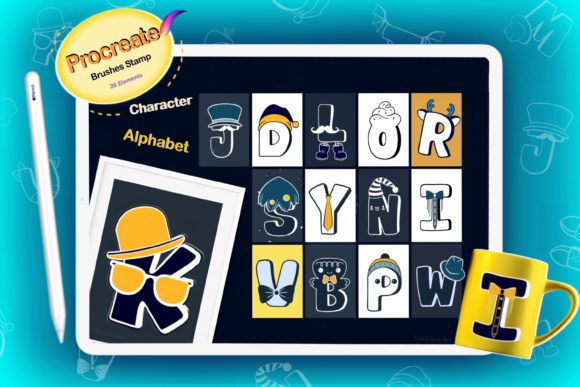
Before opening Procreate, the preparation phase involves defining the scope of your project. Are you creating a series of digital stickers for a planner community? Perhaps you are designing packaging for a small batch of holiday products? Once the objective is clear, importing the brush set becomes your first technical step. The package includes a single zip file containing 26 element stamp brushes, an instruction guide for installation, and a ReadMe file. Unzipping this file on your iPad or computer and importing it into Procreate should be done prior to starting any new canvas to ensure your library is ready for immediate use.
During the execution phase, the nature of these brushes as "stamps" changes the dynamic of lettering and illustration. Instead of drawing each character individually—a process that requires significant steady-hand skill and time—you can tap the screen to place pre-designed Christmas-themed alphabet characters. This does not diminish creativity; rather, it shifts the focus from mechanical execution to compositional arrangement. You can experiment with layout, spacing, and hierarchy much faster than if you were drawing freehand. This speed is particularly beneficial for entrepreneurs and marketers who need to iterate on multiple design variations to test what resonates best with their audience before the holiday rush peaks.
Compatibility and Technical Requirements
To leverage the full potential of this tool, it is essential to respect its technical boundaries. The Alphabet Christmas Characters Brushes are built exclusively for the Procreate app on iPad. They do not function in Adobe Photoshop, Illustrator, or other desktop-based design software. This limitation is a deliberate trade-off for the fluidity and touch-based optimization that Procreate offers. Users must have an iPad Pro or a compatible iPad model, along with an Apple Pencil or a third-party pressure-sensitive stylus. While the stamping action itself does not always rely heavily on pressure sensitivity for size variation (as stamps are often fixed or scaled via gestures), having a precise input device ensures accurate placement and a smoother overall experience.
Furthermore, the file format is critical. As an instant digital download, the product arrives as a zip archive. Users must have a file management system on their iPad capable of unzipping archives, such as the native Files app, or they must unzip the folder on a computer and AirDrop it to the tablet. Failure to properly extract the .brushset file will prevent installation. Once imported, these brushes appear in your Brush Library, ready to be selected and tapped onto the canvas. The transparent backgrounds of the stamps are a key feature, allowing them to sit cleanly over any texture, color fill, or pattern without unsightly white boxes surrounding the characters.
Diverse Applications Across Industries
The versatility of this brush set extends far beyond simple greeting cards. Its application spans various industries and use cases, making it a worthwhile investment for a wide demographic of creators.
- Digital Planning and Stationery: For creators selling digital planner inserts, these brushes can be used to create festive alphabet clips or stickers. Users can stamp out words like "NOEL" or "GIFT" and save them as individual PNG elements to be sold or used within GoodNotes and Notability.
- Small Business Branding: Entrepreneurs can utilize the set for limited-edition holiday packaging designs. By stamping custom messages directly onto mockups or printing them on labels, businesses can add a personal, handmade touch to their products without hiring a calligrapher.
- Educational Resources: Teachers and educational publishers can incorporate these characters into holiday-themed worksheets, coloring books, or classroom decorations. The cartoon style is engaging for children and simplifies the creation of visually appealing learning materials.
- Merchandise Creation: The high-resolution nature of Procreate brushes makes them suitable for print-on-demand services. Designs created with these stamps can be adapted for T-shirts, vinyl decals, and mugs, provided the canvas resolution is set correctly at the start of the project.
- Social Media and Blogging: Content creators can quickly generate blog buttons, story highlights covers, or promotional graphics. The ability to layer textures over the transparent stamps allows for on-brand customization that stands out in a crowded feed.
Optimizing Workflow for Efficiency and Quality
To truly benefit from the Alphabet Christmas Characters Brushes, one must adopt a workflow that prioritizes organization and consistency. When working on large projects, such as a full suite of holiday invitations, it is advisable to create a dedicated color palette and texture library before beginning the stamping process. Since the stamps allow you to add your own colors and patterns, having these resources pre-loaded in Procreate ensures visual cohesion across all deliverables.
A practical approach involves using layers strategically. Always stamp your characters on a new layer separate from your background. This non-destructive editing method allows you to move, resize, or recolor individual letters without affecting the rest of the composition. If you need to change the color of a specific word, you can simply use the Alpha Lock feature on that layer and fill it with a new hue. This level of control is vital for maintaining quality standards, especially when clients request revisions.
Consistency is also maintained through the uniform style of the 26-element set. Because every character shares the same line weight, cartoon aesthetic, and festive theme, your designs will naturally look professional and unified. There is no risk of mismatched fonts or inconsistent illustration styles that often occur when piecing together assets from different sources. This reliability reduces the time spent on quality control and adjustments.
Long-Term Value and Asset Management
While the immediate appeal of these brushes lies in their seasonal relevance, their long-term value is found in their reusability. Digital assets, unlike physical supplies, do not degrade over time. Once purchased and downloaded, the Alphabet Christmas Characters Brushes become a permanent part of your library. You can return to them year after year, adapting them to new trends by changing color schemes or combining them with new background textures.
Effective asset management involves backing up your digital downloads. Although the item is an instant download, keeping a copy of the original zip file in a cloud storage service or external drive ensures you can reinstall the brushes if you switch devices or reset your iPad. Additionally, documenting how you used these brushes in past successful projects can serve as a reference for future campaigns, helping you refine your process and achieve even better results in subsequent holiday seasons.
In conclusion, integrating the Alphabet Christmas Characters Brushes into your digital workflow offers a pragmatic solution for creating high-quality, festive content. By leveraging the speed of stamp-based tools within the robust environment of Procreate, creators can focus more on strategy and composition and less on repetitive drawing tasks. Whether you are a freelancer managing tight deadlines or a hobbyist looking to elevate your personal projects, this tool provides the flexibility and efficiency needed to succeed in the competitive landscape of digital design.