Maximizing Your Design Workflow with Brushes for CorelDRAW Lite Versión
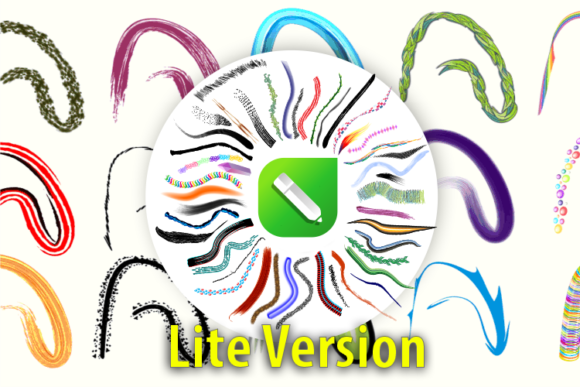
For digital artists and graphic designers working within the Windows ecosystem, the choice of tools often dictates the fluidity of the creative process. Brushes for CorelDRAW Lite Versión represents a curated entry point for users seeking to expand their vector capabilities without immediately committing to an extensive library. This package typically includes 50 distinct vector brushes, covering essential styles such as watercolor, gels, decorative patterns, oils, and pencil textures. Understanding the scope, installation process, and practical application of this lite version is crucial for determining whether it meets your current project needs or if an upgrade to a more comprehensive suite is warranted.
Defining the Scope: What the Lite Version Offers
The primary distinction of the Brushes for CorelDRAW Lite Versión lies in its focused curation. Unlike massive bundles that can overwhelm a user with hundreds of unused assets, this pack provides 50 high-quality vectors designed for immediate utility. The inclusion of diverse media simulations—ranging from the transparency of watercolors to the opacity of oils—allows designers to mimic traditional art techniques within a vector environment. This is particularly valuable for creating logos, illustrations, and decorative elements that require organic textures while maintaining the scalability inherent to vector graphics.
Each brush in this collection is engineered for ease of use. The vectors are pre-configured to work seamlessly with CorelDRAW's artistic media tool, reducing the time spent on manual configuration. For professionals evaluating resources, the "Lite" designation does not imply inferior quality; rather, it suggests a streamlined selection of the most versatile tools suitable for a wide array of general design tasks. The pack serves as a functional toolkit for those who need reliable textures for client work without the clutter of niche or highly specialized brushes that may never be utilized.
Installation and Integration on Windows
One of the significant advantages of this resource is its straightforward integration into the Windows operating system. Upon installation, the software places a dedicated link within the Windows Start Menu. This feature is designed to enhance accessibility, allowing users to launch examples or access information without navigating complex file directories. For the Brushes for CorelDRAW Lite Versión, this link often serves a dual purpose: it provides immediate access to usage examples and acts as a gateway to information regarding the full version of the software.
Once installed, the activation of these links ensures that users can quickly visualize how the 50 included brushes perform in real-world scenarios. The examples provided typically demonstrate layering techniques, opacity adjustments, and color blending specific to watercolor, gel, and oil styles. This hands-on approach helps users evaluate the tool's fit for their workflow before diving deeper into advanced features. It is a practical method of onboarding that respects the user's time, offering tangible results immediately after setup.
Comparative Analysis: Lite vs. Full Collections
When evaluating Brushes for CorelDRAW Lite Versión against larger collections, such as the full version boasting over 800 brushes, the decision largely depends on the volume and variety of your output. The lite version, with its 50 vectors, is ideal for designers who specialize in specific styles or those who prefer a minimalist workspace. It eliminates the decision paralysis that can occur when faced with an excessive number of options. If your daily work involves standard illustrative tasks, branding, or occasional textural enhancements, the lite pack offers a high return on investment regarding speed and efficiency.
Conversely, the full version caters to power users and agencies that require an exhaustive range of styles for diverse client demands. With over 800 brushes, the full library covers niche categories and experimental textures that go beyond the standard watercolor, pencil, and oil simulations found in the lite pack. For a designer working on a complex series of illustrations where each piece requires a unique atmospheric feel, the limitations of a 50-brush set may become apparent. In such cases, the trade-off shifts from simplicity to necessity, making the expanded library a more logical choice.
However, it is important to note that the core technology remains consistent across both versions. The rendering engine and the ease of installation are identical. The difference is purely in the breadth of the asset library. Therefore, starting with the Brushes for CorelDRAW Lite Versión allows users to test the compatibility and performance on their specific hardware and software configuration before upgrading. This phased approach minimizes risk and ensures that the investment aligns with actual usage patterns.
Practical Applications and Style Versatility
The 50 brushes included in this pack are selected to cover the most common stylistic requirements in modern graphic design. Watercolor brushes are particularly effective for creating soft, flowing backgrounds or adding a hand-painted aesthetic to typography. Gel brushes offer a glossy, three-dimensional look suitable for icon design and UI elements. Meanwhile, pencil and oil textures provide the grit and depth necessary for sketching concepts or creating fine art reproductions.
Decorative brushes within the pack add another layer of utility, enabling the quick creation of borders, dividers, and ornamental details that would otherwise take hours to draw manually. For example, a wedding invitation designer might rely heavily on the decorative and watercolor options to achieve a romantic, organic feel. In contrast, a tech startup branding project might utilize the gel and clean pencil strokes to convey innovation and precision. The versatility of these 50 vectors ensures that they remain relevant across different industries and design trends.
Decision Factors: When to Choose the Lite Version
Selecting the right toolset requires an honest assessment of your workflow. The Brushes for CorelDRAW Lite Versión is the optimal choice if you value a clutter-free interface and primarily work within established stylistic boundaries. It is also the recommended starting point for students or freelancers building their portfolio, as it provides professional-grade assets without the overhead of managing a massive library.
On the other hand, if your work frequently demands highly specific textures, rare artistic effects, or the ability to switch between dozens of distinct moods in a single day, you may find the 50-brush limit restrictive. In these scenarios, the existence of the full version with 800+ brushes becomes a compelling alternative. The link activated in the Start Menu after installing the lite version serves as a helpful indicator, showcasing examples of what the broader library can achieve and helping you decide if an upgrade is necessary for your long-term goals.
Final Thoughts on Resource Selection
In the landscape of digital design tools, balance is key. Brushes for CorelDRAW Lite Versión strikes a commendable balance between functionality and simplicity. It empowers users to enhance their vector artwork with realistic textures while maintaining a manageable workflow. By offering a taste of the potential through 50 carefully selected vectors and providing a clear pathway to explore the full 800+ brush library via the Windows Start Menu integration, it respects the user's autonomy in choosing the right resources. Whether you stay with the lite version or eventually expand to the full suite, the foundation provided by this toolset supports a professional and efficient design process.