Blue Moon Procreate Brushes Palette: Textured Lettering
Digital art often struggles to capture the tactile feel of traditional media, leaving designs looking too clean or sterile. The Blue Moon Procreate Brushes Palette solves this by introducing a distinct, organic texture inspired by the surface of the moon itself. This isn't just another set of smooth vector lines; it is a textured lettering brush set designed to bring depth and character to your digital canvas. Whether you are a seasoned graphic designer or someone just picking up an Apple Pencil for the first time, adding texture is one of the fastest ways to elevate the quality of your work. This specific collection focuses on versatility, offering tools that work seamlessly for both screen-based projects and physical printed goods.
The core appeal of this pack lies in its ability to mimic natural imperfections. When you stroke the canvas, the brush deposits pigment in a way that feels gritty and real, much like using a dry marker on rough paper or a stamp on cardstock. This makes the Blue Moon Procreate Brushes Palette an exceptional choice for DIY projects where a handmade aesthetic is desired. Instead of spending hours overlaying noise filters or searching for texture images, you get that look directly from the brush tip. It streamlines the workflow for creators who need to produce high-quality visuals quickly without sacrificing artistic integrity.
What Is Inside the Brush Set?
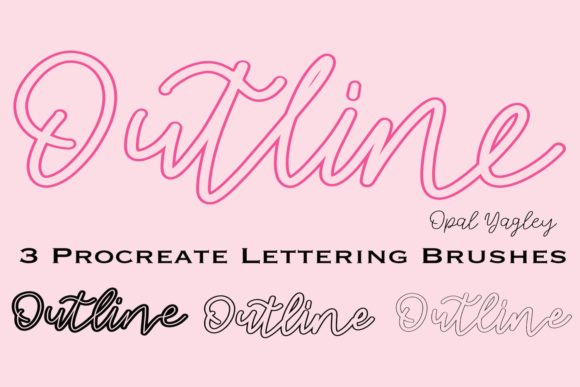
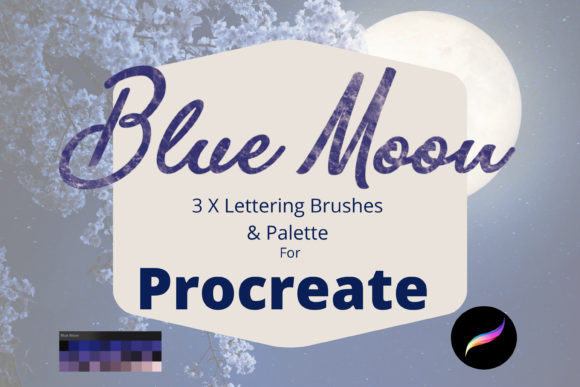
Understanding the specific tools available helps you visualize how they fit into your creative process. This pack is concise but powerful, including three specialized lettering brushes and a custom color palette. Each brush serves a unique function, allowing you to build complex typographic compositions with ease.
- Standard Moon: This is your workhorse brush. It provides the primary textured stroke, perfect for bold headlines, main body text in illustrations, or drawing organic shapes. The texture is consistent, giving you reliable coverage every time you use it.
- Colour Changing Moon: This brush adds a dynamic element to your art. As you draw, the hue shifts slightly, creating a gradient effect within a single stroke. This is ideal for adding visual interest to logos or making certain words pop in a quote graphic without needing to manually edit colors later.
- Edging Moon Brush: Designed for outlines and borders, this tool helps define shapes and add emphasis. It pairs beautifully with the standard brush to create a layered, dimensional look for your lettering.
- Blue Moon Palette: To complement the brushes, the set includes a curated color palette. These colors are pre-selected to harmonize with the lunar texture, saving you time on color theory and ensuring your designs look cohesive from the start.
Practical Uses for Creators and Entrepreneurs
The versatility of this textured lettering set extends far beyond simple doodling. For small business owners and entrepreneurs, especially those in the print-on-demand space, these brushes are a goldmine. Because the texture holds up well when scaled, you can use the clip art elements and lettering for a wide variety of products. Imagine designing custom wrapping paper with hand-lettered names, creating unique invitations for weddings, or crafting eye-catching greeting cards that feel personal rather than mass-produced.
Scrapbooking enthusiasts will also find immense value here. Digital scrapbooking allows you to preserve memories without the physical clutter, and the Blue Moon Procreate Brushes Palette provides the authentic feel of ink and paper. You can create journal entries, label photos, and design decorative frames that look like they were cut and pasted by hand. Similarly, for those creating wall art, the textured strokes add a gallery-worthy finish to digital prints. The "grain" in the brush prevents the art from looking flat when printed on large canvases or posters.
Educators and content creators can use these tools to make learning materials more engaging. Hand-drawn style worksheets, social media graphics for blogs, and marketing headers all benefit from the approachable, human touch that textured brushes provide. In a world saturated with polished, corporate aesthetics, a design that looks slightly imperfect and handmade often connects better with audiences.
Technical Requirements and Setup
Before diving into creation, it is crucial to understand the technical ecosystem required for these files. The Blue Moon Procreate Brushes Palette consists of digital assets specifically engineered for the Procreate app. This means they are not compatible with Photoshop, Illustrator, or Android-based drawing apps. To use them effectively, you must have an iPad with the Procreate application installed. While they work on various iPad models, using an Apple Pencil is highly recommended to fully utilize the pressure sensitivity and tilt features that make the texture react naturally to your hand movements.
The installation process is straightforward but requires a few specific steps. Since these are compressed files, you cannot open them directly in Procreate. First, you need a platform to download the files, such as iCloud Drive or email. Once downloaded to your iPad, you will need a file management app like iZip to unzip the folder. After extracting the contents, you simply tap the brush files, and they will automatically import into Procreate, usually appearing in a new folder named "Blue Moon" or similar within your brush library. Having a basic understanding of file management on iOS will ensure a smooth setup experience.
Things to Consider Before Buying
While this brush set offers tremendous value, it is important to align your expectations with your current setup. If you do not own an iPad or prefer working on a desktop computer, these brushes will not be usable for you. Additionally, because the texture is a defining feature, the result depends somewhat on the canvas resolution you choose. For print projects like invitations or wall art, always start with a high-resolution canvas (at least 300 DPI) to ensure the texture remains crisp and does not appear pixelated when printed.
Beginners should also note that textured brushes can sometimes behave differently than standard round brushes. They may require a slightly steadier hand or different pressure settings to achieve the desired opacity. However, this learning curve is minimal and part of the fun of digital crafting. The included palette helps mitigate decision fatigue, allowing you to focus on mastering the brush strokes rather than worrying about color combinations.
Ultimately, the Blue Moon Procreate Brushes Palette is more than just a download; it is a toolkit for adding soul to your digital designs. Whether you are launching a new product line, documenting your life through digital scrapbooking, or simply exploring the joys of lettering, these brushes provide the texture and depth needed to make your work stand out. By bridging the gap between digital convenience and analog charm, they empower creators to produce professional-grade results with a distinctly human touch.