Mastering the Art of Digital Ripping with Procreate Torn Brushes
In the rapidly evolving landscape of digital design, the pursuit of tactile authenticity remains a priority for many creators. While vector graphics and clean lines have their place, there is a distinct visual weight to organic textures that commands attention. This is where specialized tools like Procreate Torn Brushes become essential assets in a designer's toolkit. These are not merely decorative stamps; they are dynamic instruments designed to replicate the unpredictable, raw edge of physically torn paper within the iOS ecosystem.
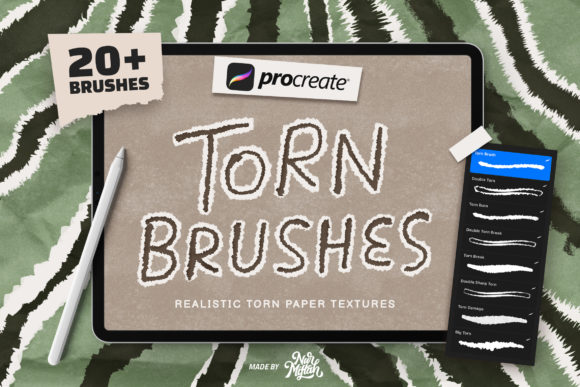
The introduction of these brushes, often accompanied by bonus paper texture overlays, addresses a specific gap in mobile design workflows. Creating a realistic tear effect manually using standard erasers or masking tools can be time-consuming and often yields results that look too uniform or digitally perfect. The core value proposition of this brush set lies in its ability to introduce controlled chaos. With 20 different shapes embedded in every single stroke, the brush ensures that no two lines look identical. This variation mimics the natural irregularity found when ripping actual stock photography or cardstock, providing an immediate upgrade to the visual fidelity of your projects.
The Mechanics of Realistic Texture
What sets these Procreate Torn Brushes apart from generic texture packs is the underlying engineering of the brush engine. In traditional digital painting, achieving a torn edge often requires layering multiple images or meticulously drawing jagged paths. This new collection streamlines that process into a single swipe. The inclusion of twenty varying shapes within the stroke algorithm means that as you drag your Apple Pencil across the canvas, the software randomly selects and applies different edge profiles. This prevents the "repeating pattern" look that plagues lower-quality brush sets, ensuring that long strokes maintain their organic integrity from start to finish.
Furthermore, the addition of bonus paper texture brushes complements the tearing effect perfectly. A torn edge looks most convincing when paired with the grain of the material it was ripped from. These texture brushes allow designers to overlay subtle noise, fiber patterns, or coarse grain directly onto their compositions. This dual approach—combining the shape of the tear with the surface quality of the paper—creates a cohesive aesthetic that feels grounded and physical, even on a retina display.
Practical Applications for Modern Creators
The utility of these tools extends far beyond simple illustration. For professionals working in social media marketing, the demand for content that stands out in a saturated feed is constant. Mood boards, in particular, benefit immensely from this analog-digital hybrid style. By using these brushes to frame images or create collage-style layouts, marketers can evoke a sense of curated authenticity that resonates with audiences tired of overly polished corporate graphics.
Consider the workflow of a freelancer creating promotional materials for a boutique brand or an event poster. The ability to quickly generate a ripped-paper border or a textured background element saves hours of editing time. Instead of searching for stock photos of torn paper—which may not match the desired color palette or resolution—you can generate custom edges on the fly. This flexibility is crucial for maintaining brand consistency while adhering to tight deadlines. The brushes are equally effective for educators creating engaging visual aids or bloggers looking to add a personal, hand-crafted touch to their digital publications.
Compatibility and Technical Constraints
It is vital to approach these assets with a clear understanding of their technical environment. These brushes are engineered specifically for the iOS app Procreate. They leverage the unique rendering engine and pressure sensitivity data provided by the iPad and Apple Pencil combination. Consequently, it is important to note that these files do not work in Photoshop or other desktop-based applications. Attempting to import them into incompatible software will result in errors or non-functional assets. This limitation is not a flaw but a reflection of the specialized optimization for the Procreate platform.
Regarding version compatibility, these brushes demonstrate robust longevity. They are fully functional on Procreate 5X and remain compatible with earlier versions of the application. This backward compatibility is a significant advantage for users who may not have updated their software immediately or who prefer the interface of older iterations. It ensures that the investment in these tools remains viable regardless of your current software setup. However, users should always ensure their iPad OS is up to date to prevent any potential latency issues when using high-complexity brushes with multiple shape variations.
Evaluating Usability and Workflow Integration
From a usability standpoint, the learning curve for these brushes is virtually non-existent. They are designed for immediate application; select the brush, choose your color, and sweep. There is no need to tweak complex settings or adjust flow dynamics unless you wish to personalize them further. This "plug-and-play" nature makes them accessible to serious hobbyists who may not have deep technical knowledge of brush engines, while still offering enough depth for professional illustrators to integrate into complex layers.
The consistency of the stroke is another area where these tools excel. Despite the randomization of the 20 shapes, the overall density and opacity of the stroke remain predictable. This reliability allows designers to build upon their work without worrying about unexpected gaps or jarring shifts in texture. When used in conjunction with the bonus paper textures, the result is a layered composition that feels intentional rather than accidental.
However, like any digital tool, there are limitations to consider. Because the effect relies on procedural generation within the app, extremely large-scale prints might require higher resolution canvases to maintain the crispness of the fine paper fibers. Additionally, while the variety of shapes is extensive, users working on highly specific, repetitive patterns might find the randomness slightly challenging to control if they need an exact replica of a previous stroke. In such cases, utilizing the "duplicate layer" function or saving specific stroke selections as separate elements is a recommended workaround.
Long-Term Value for Design Projects
The true measure of a digital asset is its longevity in your workflow. Procreate Torn Brushes offer sustained value because the trend toward organic, collage-style aesthetics shows no sign of fading. As algorithms favor unique, eye-catching visuals on platforms like Instagram and Pinterest, having a reliable method to create custom textures becomes a strategic advantage. Unlike static PNG overlays that can pixelate or look generic when reused, these brushes generate infinite variations, keeping your content fresh.
For small business owners and entrepreneurs managing their own branding, these tools democratize high-end design techniques. You no longer need to outsource texture creation or purchase expensive stock subscriptions. The ability to create bespoke mood boards, product mockups, and social media graphics in-house empowers creators to iterate faster and experiment more freely.
In conclusion, if your work involves digital collage, editorial design, or social media content creation, integrating these torn paper effects can significantly elevate the perceived quality of your output. They bridge the gap between the convenience of digital editing and the soul of analog materials. While they are strictly bound to the Procreate ecosystem, their performance within that environment is exemplary. Whether you are refining a client presentation or exploring personal artistic expression, these brushes provide a reliable, versatile, and visually striking solution. Should you encounter any specific technical questions regarding installation or usage within your specific version of Procreate, reaching out to the creator is always advisable to ensure you are maximizing the potential of your new tools. Enjoy the process of bringing a tangible, tactile feel to your digital canvas.