Mastering Digital Impasto: A Practical Review of the 64 Oil Brushes for Procreate
The transition from traditional canvas to the iPad screen often hinges on one critical factor: the authenticity of the brush engine. For digital artists seeking the tactile resistance and visual depth of oil painting, generic tools rarely suffice. This is where specialized asset packs like the 64 Oil Brushes for Procreate become essential components of a professional workflow. This collection is not merely a bundle of standard strokes; it is a curated toolkit designed to replicate the complex behavior of wet media, offering a bridge between classical technique and modern efficiency.
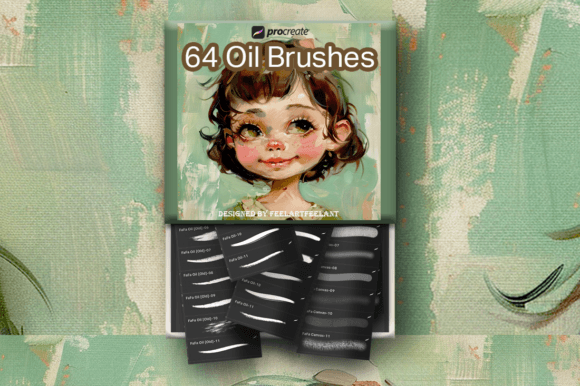
At its core, this pack addresses a common frustration among digital painters: the "flat" look that plagues many default brushes. By integrating 64 distinct tools, the set covers the entire painting process, from initial sketching to final glazing. The breakdown includes 21 dedicated oil brushes for general application, 21 old oil brushes that simulate worn bristles and textured strokes, 14 oil canvas brushes for background work, 5 oil stamps for rapid texture placement, and 3 oil tip line brushes for precision detailing. This variety ensures that an artist does not need to constantly switch apps or hunt for external resources mid-project.
Technical Composition and Versatility
The strength of this brush pack lies in its segmentation. Having access to Old Oil Brushes alongside standard ones allows for a level of narrative within the artwork. Fresh brushes lay down smooth, consistent color, while the "old" variants introduce streaks, gaps, and irregularities that mimic the wear of physical tools. This distinction is vital for creating organic, non-repetitive textures that keep the viewer's eye engaged.
Furthermore, the inclusion of Oil Canvas Brushes is a significant value add. Often, artists spend excessive time searching for or creating seamless background textures. With 14 variations included, users can instantly establish a ground that interacts realistically with the paint layers above it. The Oil Stamp brushes serve as time-savers for adding impasto highlights or specific textural elements without manually painting every stroke, while the Oil Tip Line brushes provide the control necessary for signing work or adding fine details that standard oil brushes might obscure.
It is important to note the technical constraints immediately. These assets are engineered specifically for Procreate version 5.0.8 or 5X on the iPad using an Apple Pencil. They do not function in Photoshop, Clip Studio Paint, or other desktop software. This exclusivity means the investment is only viable for those fully committed to the Apple ecosystem. However, within that environment, the integration is seamless, leveraging Procreate's grain and shape dynamics to simulate physical resistance.
Real-World Performance and Workflow Efficiency
In practical application, the 64 Oil Brushes for Procreate excel in scenarios requiring speed without sacrificing quality. For concept artists and illustrators working under tight deadlines, the ability to switch between a broad wash, a textured scumble, and a fine liner without leaving the canvas is invaluable. The brushes respond well to pressure sensitivity and tilt, allowing for dynamic stroke variation that feels intuitive rather than programmed.
Consider a portrait session where the goal is to capture the luminosity of skin tones. The layering capability of these oil brushes allows for a "fat over lean" approach similar to traditional methods. Artists can build up opaque highlights over translucent underpaintings, achieving a depth that flat digital brushes struggle to replicate. The texture interaction is particularly notable; when used on a canvas texture layer, the brushes catch the grain, breaking up the color in a way that mimics paint settling into the weave of a real linen canvas.
For educators and content creators, this pack offers a reliable standard for teaching digital painting fundamentals. Because the brushes behave predictably and mimic real-world physics, instructors can demonstrate techniques like blending, glazing, and dry brushing with results that translate well to students who may be learning traditional methods simultaneously.
Licensing and Commercial Viability
From a business perspective, the licensing terms associated with this product are highly favorable for freelancers, small business owners, and entrepreneurs. The license permits the creation of unlimited products, both physical and digital, for personal and commercial use. This means an artist can utilize these brushes to create illustrations for book covers, designs for merchandise, assets for video games, or marketing materials for clients without worrying about additional royalty fees or usage restrictions.
You are explicitly authorized to create digital end products that you sell. This opens revenue streams for those looking to monetize their art directly. However, there is a clear boundary regarding the assets themselves: you are not authorized to resell, share, redistribute, or transfer the actual brush files to any third party. You cannot claim the product or its adaptation as your own copyrighted work. This protects the creator's intellectual property while granting the user full freedom over the art produced with the tools. It is a standard and fair agreement in the digital asset market, ensuring the tool remains exclusive to purchasers while the output remains the property of the artist.
Potential buyers should also be aware of the refund policy. Due to the nature of the item being a digital product, there are no refunds for these sales. This underscores the importance of verifying compatibility before purchase. Ensuring your iPad and Procreate app are updated to the required versions (5.0.8 or 5X) is a necessary step to avoid dissatisfaction.
Who Benefits Most from This Toolkit?
This collection is ideally suited for a specific demographic of creators. Professional illustrators who need to deliver high-fidelity, painterly work will find the range of textures indispensable. Hobbyists transitioning from traditional oils to digital will appreciate the familiarity of the stroke mechanics, reducing the learning curve associated with new software.
Additionally, marketers and bloggers who require unique, hand-crafted visuals for their content can benefit significantly. In an era where stock photography feels ubiquitous, custom oil-painted graphics can provide a distinctive brand identity. The ability to produce unlimited commercial works makes this a cost-effective solution for small agencies or solo entrepreneurs who need to generate diverse visual assets regularly.
However, those whose workflow relies heavily on vector graphics, 3D modeling, or photo manipulation may find less utility here. The brushes are specialized for raster-based painting. If your primary output is clean, flat design or technical illustration, the organic, textured nature of these oil brushes might not align with your aesthetic goals.
Final Assessment on Value and Longevity
The 64 Oil Brushes for Procreate represent a robust addition to any digital artist's library. The sheer volume of tools, combined with the specific categorization into old, new, canvas, and detail brushes, suggests a thoughtful curation process aimed at solving real painting problems. The capacity to create unlimited commercial works adds a layer of long-term value that extends far beyond the initial download.
While the lack of cross-platform support limits its audience to iPad users, those within the ecosystem will find these brushes to be reliable, effective, and capable of producing gallery-quality results. The restriction on reselling the brushes themselves is a minor trade-off for the extensive freedom granted over the final artwork. For anyone serious about mastering the oil painting aesthetic on the iPad, this pack provides the necessary foundation to execute complex, textured, and emotionally resonant pieces efficiently.