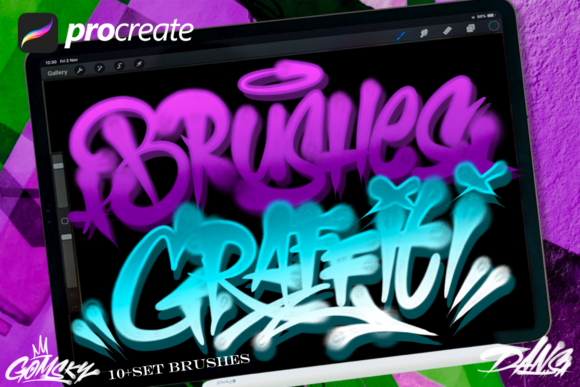
Master Digital Street Art with Graffiti Brushes 2
We have been immersed in the world of graffiti for a long time, watching the culture evolve from subway cars to gallery walls. Recently, however, we noticed a significant shift in demand. Artists and designers are no longer just looking for spray cans; they are seeking specific digital materials that allow them to translate that raw, analog energy onto screens. As creators who focus almost exclusively on analog artwork, we understand the nuance of hand-style lettering better than most. We know exactly what is missing when you switch from a cap to a stylus. That realization drove us to spend countless hours developing handmade resources that bridge this gap, resulting in a toolset designed specifically for the iPad Pro and Apple Pencil.
The transition to digital often feels sterile. Many existing brush sets rely on perfect vectors or overly clean textures that lack the grit of real street art. Graffiti Brushes 2 was born out of our extensive study into what works and what fails in the digital realm. We didn't just scan a texture and call it a day; we deconstructed the mechanics of how paint hits a surface, how it drips, and how it splashes. The result is a collection that doesn't just mimic graffiti—it behaves like it. This set includes comprehensive tools complete with realistic drips, dynamic splashes, and templates of actual graffiti tools, offering you a perfect possibility of creation without the mess or the legal risks associated with painting in public spaces.
Bridging the Analog and Digital Divide
The core philosophy behind Graffiti Brushes 2 is authenticity. When we followed up our initial release with this second iteration, our goal was to refine the user experience for those who demand high-fidelity results. While the first set made it easier to be creative with analog touches, this version digs deeper into the specifics of flow and pressure sensitivity. It allows you to create lettering designs, posters, flyers, or any visual asset without limitations, ensuring the final output looks as if it were executed with a can of Montana Gold or Molotow.
One of the standout features of this pack is its attention to the imperfections that make street art beautiful. In the analog world, a runny line or an accidental splash adds character. In the digital world, these are often smoothed out by software algorithms. Our brushes preserve these organic elements. Whether you are sketching a quick throw-up or rendering a complex mural piece, the brush engine responds to your hand movements with a natural variance that prevents your work from looking repetitive or computer-generated.
Key Characteristics and Strengths
What sets Graffiti Brushes 2 apart from the sea of generic art supplies available online is the depth of customization and the variety included in the package. This set includes five amazing graffiti brushes, each engineered for a specific purpose within the workflow of a modern creator:
- The Liner: Designed for sharp, crisp outlines that mimic the feel of a skinny cap. It maintains consistent width under pressure but allows for quick flicks at the ends of strokes.
- The Filler: A broad, textured brush that covers large areas quickly while retaining the subtle grain of a concrete wall or brick surface underneath.
- The Drip Generator: Perhaps the most requested feature, this tool allows you to add realistic paint runs that follow gravity, adding immediate depth and realism to flat letters.
- The Splash Tool: Perfect for adding background noise or energetic accents, this brush scatters pigment in a way that feels random yet controlled.
- The Texture Overlay: A unique inclusion that lets you stamp worn-out surfaces or stencil patterns directly into your composition.
These tools are not static images; they are dynamic engines within Procreate. They react to tilt, speed, and pressure, giving you the tactile feedback necessary to trust the digital medium. For professionals who have spent years mastering physical media, this level of responsiveness is crucial for maintaining their artistic voice when moving to an iPad.
Practical Applications Across Industries
The utility of Graffiti Brushes 2 extends far beyond hobbyists wanting to doodle on their tablets. For professionals in marketing, branding, and design, these brushes offer a powerful way to inject urban credibility into commercial projects. Imagine a beverage company launching a new energy drink targeting Gen Z; using authentic-looking hand styles created with these brushes can make a campaign feel grounded and edgy rather than corporate and polished.
Educators and workshop leaders can also leverage this toolset to teach the fundamentals of typography and composition without the logistical hurdles of organizing a physical paint session. Students can experiment with scale, color theory, and letter structure endlessly, undoing mistakes and iterating rapidly. This accelerates the learning curve, allowing beginners to grasp the mechanics of wildstyle or bubble letters before they ever pick up a physical can.
For freelancers and agency owners, efficiency is key. Creating custom lettering for a logo or a social media graphic traditionally requires sketching, scanning, vectorizing, and refining. With Graffiti Brushes 2, much of this process happens in a single environment. You can sketch, ink, color, and texture a piece entirely on the iPad Pro, exporting print-ready files in a fraction of the time. This streamlines the workflow for tight deadlines while maintaining a high-end, hand-crafted aesthetic that clients love.
Maximizing Your Creative Workflow
To get the most out of this resource, it is important to approach it with the mindset of a practitioner, not just a consumer. Start by experimenting with the pressure curves in your settings. Every artist holds their Apple Pencil differently, and tweaking the sensitivity to match your personal touch will yield the most natural results. Don't be afraid to layer the brushes; use the filler for the base, the liner for definition, and finish with the splash and drip tools to unify the piece.
Consider the context of your final output. If you are designing a flyer for a music event, lean into the gritty textures and heavy drips to convey energy. If you are working on a brand identity that needs to feel approachable but stylish, dial back the chaos and focus on clean linework and subtle texture. The versatility of Graffiti Brushes 2 lies in your ability to modulate its intensity. It is a toolkit that adapts to your vision, rather than forcing your vision to adapt to the tool.
Ultimately, the value of these brushes is measured by the freedom they provide. They remove the barriers between imagination and execution. Whether you are a seasoned muralist looking to plan your next big wall, a graphic designer needing a unique typographic element, or an entrepreneur building a brand with an urban edge, this set provides the digital infrastructure to support your creativity. By combining decades of analog experience with modern technology, we have created a resource that honors the roots of graffiti while pushing its potential into the future of digital design.