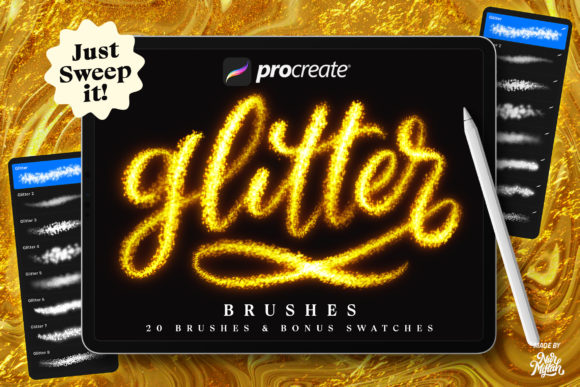
Sparkle with 20 Procreate Glitter Brushes
In the world of digital illustration, texture is often the difference between a flat image and a captivating piece of art. Achieving realistic shimmer, metallic sheen, or festive sparkle can be technically demanding when building brushes from scratch. This is where a dedicated set of Procreate Glitter Brushes becomes an invaluable asset for creators. By introducing a curated pack of 20 distinct glitter brushes accompanied by bonus swatches, artists gain immediate access to high-quality textures that elevate their work without the steep learning curve of custom brush engineering.
These tools are designed with care to ensure they are easy to use for everyone, from seasoned graphic designers to hobbyists exploring digital media for the first time. The primary value proposition lies in efficiency and aesthetic quality. Instead of spending hours adjusting grain, scattering, and opacity settings to mimic light reflection, users can focus entirely on composition and storytelling. The brushes are optimized specifically for the iOS app Procreate, ensuring smooth performance on iPads while delivering complex visual results with a single stroke.
Maximizing Visual Impact on Dark Backgrounds
One of the most effective ways to utilize this specific brush pack is against dark backgrounds. Glitter and metallic effects rely heavily on contrast to pop visually. When applied over deep blues, rich blacks, or midnight purples, the particles in these brushes catch the "light" of the screen, creating a convincing illusion of depth and luminescence. This technique is particularly useful for creating night scenes, cosmic illustrations, or luxury branding materials where a sense of premium quality is required.
The included bonus swatches play a crucial role here. The pack provides gold, brown, and neon color palettes specifically tuned to interact well with the brush engine. For instance, using the provided gold swatches on a charcoal background can simulate high-end foil stamping, perfect for mockups of business cards or book covers. Similarly, the neon options allow for vibrant, electric effects that stand out aggressively in low-light compositions, making them ideal for concert posters or cyberpunk-themed artwork.
Versatile Applications Across Industries
The utility of these Procreate Glitter Brushes extends far beyond simple illustration. Professionals in various fields can integrate these tools into their workflows to solve specific design challenges. Consider the needs of small business owners managing their own social media presence. During peak seasons like Christmas, New Year's, or birthdays, engagement often hinges on visually striking content. A static post enhanced with subtle glitter overlays or hand-lettered greetings using these brushes can significantly increase stop-scroll power on platforms like Instagram and Pinterest.
Furthermore, entrepreneurs in the jewelry or luxury goods sector can benefit immensely. Branding for a diamond shop or a gold retailer requires imagery that conveys value and brilliance. While professional photography is essential, digital assets used in web banners or email newsletters often need extra enhancement. These brushes allow marketers to add realistic sparkle to product photos or create promotional graphics that align with the tactile feel of precious metals and stones. The brown and gold tones included in the palette are especially pertinent for creating earthy yet luxurious aesthetics common in high-end packaging design.
Streamlining Photo Editing and Decoration
For photographers and photo editors working within the iPad ecosystem, these brushes offer a non-destructive way to add magical elements to portraits or event photography. Whether it is adding a whimsical glow to a birthday party snapshot or enhancing the festive atmosphere of a holiday card, the ability to paint light directly onto an image saves considerable time compared to desktop-based layer masking techniques. The variety within the 20-brush set means users can choose between fine, dust-like particles for subtlety or larger, chunkier flakes for bold statements.
Educators and content creators can also leverage these tools to make educational materials more engaging. Diagrams, certificates of completion, or reward charts for students become more exciting when adorned with custom glitter elements. The ease of use ensures that even those with limited technical drawing skills can produce professional-looking decorative elements that hold attention and convey celebration.
Technical Compatibility and Limitations
It is vital for potential users to understand the technical environment required for these tools. These brushes are engineered exclusively for the iOS APP Procreate. They utilize the specific rendering engine and texture algorithms native to Apple's iPad operating system. Consequently, these files do not work in Photoshop or other desktop applications like Clip Studio Paint or Affinity Designer. Attempting to import them into unsupported software will result in errors or unrecognized file types.
However, within the Procreate ecosystem, compatibility is robust. The brushes function seamlessly on Procreate 5X as well as earlier versions, ensuring that users with older software updates can still take advantage of the features. This backward compatibility is important for freelancers or students who may not always have the latest device or software update immediately available. Before purchasing or downloading, users should verify they are working on an iPad with Procreate installed to avoid frustration.
Enhancing Creativity Through Color Experimentation
A standout feature of this pack is the encouragement to experiment with the provided color palettes. Digital art often suffers from repetitive color choices, but having pre-selected gold, brown, and neon swatches pushes creators to try combinations they might not have considered. The interplay between a neon pink glitter stroke and a deep brown background can create unexpected visual tension that draws the eye. This aspect of the toolset supports creative growth by lowering the barrier to color theory experimentation.
Users are advised to test different blend modes within Procreate alongside these brushes. While the brushes are made to look good on default settings, combining them with "Add," "Screen," or "Overlay" blend modes can yield unique results suitable for different lighting conditions in a piece. This flexibility allows a single brush to serve multiple purposes, from simulating snowflakes in a winter landscape to representing sparks in an industrial design sketch.
Making the Right Choice for Your Workflow
Deciding to incorporate specialized brushes like these comes down to evaluating your current workflow bottlenecks. If you find yourself frequently needing to add texture but lacking the time to create it manually, this set offers a practical solution. It is particularly beneficial for those who value speed without sacrificing quality. However, if your work relies heavily on vector graphics or requires absolute scalability without pixelation, remember that raster-based brushes in Procreate have resolution limits tied to your canvas size.
For those ready to enhance their digital toolkit, these Procreate Glitter Brushes provide a focused, high-value addition. They bridge the gap between complex texturing techniques and immediate artistic expression. Whether you are designing a holiday campaign, branding a luxury product, or simply adding a touch of magic to a personal sketch, the combination of 20 varied brushes and thoughtful color swatches offers a comprehensive solution. As with any digital tool, the best results come from practice and experimentation, so users are encouraged to explore every setting and color option available.
If you encounter any issues with installation or have questions regarding specific features, reaching out to the creator is recommended. Support ensures that you can fully enjoy the brush pack and integrate it smoothly into your projects. Ultimately, the goal is to empower your creativity, allowing you to produce sparkling, professional-grade artwork with confidence and ease.