Procreate Lightning Brushes: Spark Your Digital Art
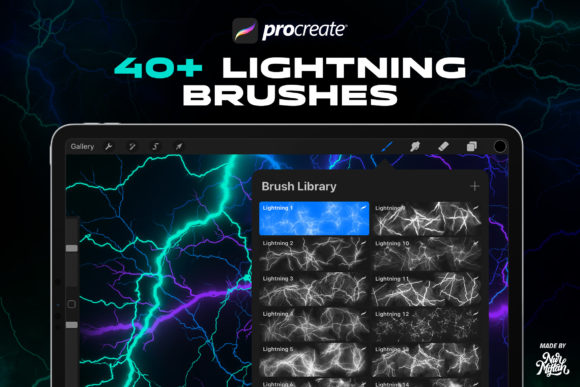
Digital art often hinges on the right tools to transform a simple sketch into a masterpiece. Among the most exciting additions to an artist's toolkit are specialized texture brushes that add depth and energy without requiring hours of manual detailing. Procreate Lightning Brushes offer exactly this kind of creative boost. Designed specifically for the iPad, this collection introduces 40 unique brushes crafted to simulate the raw power and intricate beauty of electrical discharges. Whether you are a seasoned illustrator or just picking up your Apple Pencil for the first time, understanding how these tools work can open up new avenues for your visual storytelling.
The core appeal of this brush set lies in its authenticity. Unlike generic stroke tools that repeat a single pattern, these brushes are made from a combination of real space objects and high-resolution textures. This attention to detail ensures that every swipe of your stylus produces a stroke with varied shapes and organic imperfections. The result is an image quality that feels tangible and dynamic. When you apply these strokes, you aren't just drawing a line; you are generating a complex cluster of energy that mimics natural phenomena. This level of sophistication allows creators to achieve professional-grade effects quickly, saving time on rendering while elevating the overall aesthetic of their work.
Why These Brushes Stand Out
One of the most distinctive characteristics of Procreate Lightning Brushes is their behavior against different backdrops. While they look interesting on white or colored canvases, they truly come alive when used on a black background. The contrast highlights the luminous quality of the strokes, making them appear as if they are glowing in the dark. This makes them an ideal choice for artists working on night scenes, cosmic illustrations, or any project requiring a dramatic, high-contrast vibe. The variation in every stroke means you rarely have to worry about repetitive patterns ruining the illusion of realism.
Made with care, this collection addresses a common pain point for digital painters: the struggle to create believable energy effects manually. Drawing lightning or electricity from scratch requires a deep understanding of anatomy, physics, and light behavior. These brushes simplify that process by embedding those complexities into the tool itself. You can focus on composition and color theory while the brush handles the intricate texturing. This balance between automation and artistic control is what makes the set so valuable for both beginners learning the ropes and professionals looking to speed up their workflow.
Versatile Applications for Creators
The utility of Procreate Lightning Brushes extends far beyond simple doodles. Their versatility makes them suitable for a wide range of projects across personal, commercial, and educational contexts. Here are several ways you can integrate them into your workflow:
- Social Media Assets: Create eye-catching stories or posts that stop the scroll. A burst of lightning can highlight a sale announcement or add drama to a promotional graphic.
- Book and Movie Covers: Genre fiction, particularly sci-fi and fantasy, relies heavily on atmospheric elements. These brushes can generate the perfect backdrop for a thriller novel or a superhero movie poster.
- Illustrations and Concept Art: Add magical effects to character designs or environmental concepts. Whether it's a wizard casting a spell or a futuristic city powered by energy grids, these tools fit seamlessly.
- Poster Design: Event posters for music concerts or gaming tournaments often require high-energy visuals. Lightning effects can convey intensity and excitement instantly.
- Background Creation: Use the brushes to build textured backgrounds that add depth to UI designs or web banners without overwhelming the foreground content.
For educators and content creators, these brushes can also serve as excellent teaching aids. Demonstrating how light interacts with darkness or explaining weather phenomena becomes more engaging when you can visualize it instantly on screen. Small business owners selling digital products can use these assets to enhance their branding materials, giving their online presence a polished, custom look that stands out from template-based designs.
Important Compatibility Notes
Before diving in, it is crucial to understand the technical requirements of this toolset. Procreate Lightning Brushes are designed exclusively for the iOS app Procreate. They do not work in Adobe Photoshop, Clip Studio Paint, or any other desktop or mobile applications. This limitation is due to the proprietary brush engine that Procreate uses, which allows for the complex rendering of the real space object textures included in the set.
Good news for long-time users: these brushes are fully compatible with Procreate 5X and earlier versions. You do not need to update your software to the absolute latest version to enjoy them, ensuring that anyone with a relatively recent iPad setup can get started immediately. However, always ensure your iPad model supports the version of Procreate you are running to avoid performance lag when using high-detail brushes.
Tips for Getting the Best Results
To maximize the potential of Introducing 40 Procreate Lightning Brushes, consider experimenting with layer blending modes. Setting your lightning layer to "Add," "Screen," or "Linear Dodge" can enhance the glow effect, especially on dark canvases. Additionally, varying your pressure sensitivity while drawing can reveal different aspects of the brush shapes, giving you even more control over the final output. Don't be afraid to stack multiple strokes with reduced opacity to build up density and complexity.
Remember that while these tools are powerful, they work best when used with intention. Think about the direction of your light source and how the electricity would naturally travel. Even with automated textures, applying basic principles of art will make your results look more convincing. If you encounter any issues or have questions about specific features, reaching out to the creator is encouraged. Good communication ensures you get the most out of your purchase and helps resolve any technical hiccups quickly.
Ultimately, adding Procreate Lightning Brushes to your library is an investment in your creative efficiency and artistic range. They bridge the gap between imagination and execution, allowing you to produce stunning visual effects with ease. Whether you are designing a marketing campaign, illustrating a children's book, or simply exploring digital art as a hobby, these brushes provide the spark you need to bring your ideas to life. Enjoy the process, experiment freely, and watch your digital creations shine.