Premium Halftone Brushes for Procreate: Retro Style
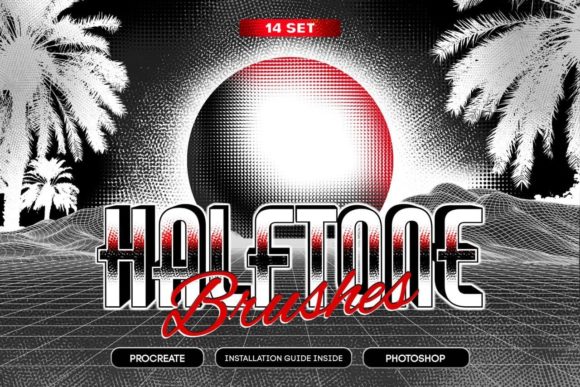
If you have ever tried to recreate the gritty, sun-faded look of a 1970s comic book or a vintage concert poster using standard digital tools, you know the struggle. Standard airbrushes often feel too smooth, too clean, and frankly, too perfect. They lack the mechanical imperfections that give retro art its soul. This is where Premium Halftone Brushes for Procreate changes the workflow entirely. Instead of manually plotting thousands of dots or hunting for seamless textures to overlay, this collection puts authentic, variable-density shading right at your fingertips. It is not just about adding noise; it is about injecting a specific personality into your work that feels tactile, printed, and undeniably human.
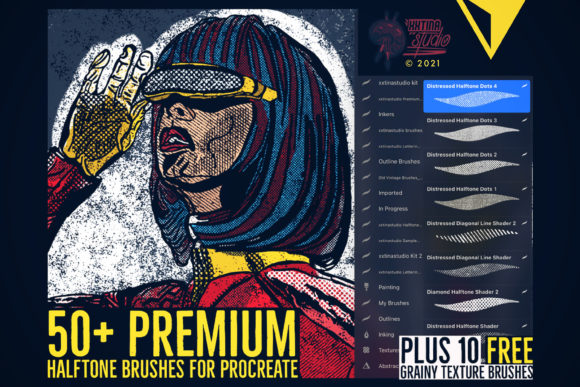
The core of this toolkit lies in its 50 premium halftone shading texture line and dot brushes. What sets these apart from free alternatives is the nuance in their engineering. Each brush offers varying density, opacity, and alignments, allowing you to mimic the way ink actually sits on paper. You can achieve tight, crisp dot patterns for mid-tones or stretch them out into loose, distressed lines that scream "underground zine." The ability to control alignment means you aren't stuck with a rigid grid; you can angle your shading to follow the contour of a muscle in an illustration or the curve of a letterform in a custom logo. Complementing these are 10 bonus grainy texturizing brushes designed to add that final layer of wear and tear. These are perfect for knocking back the brightness of a solid color block or adding a subtle film grain over a finished piece to unify the composition.
Where Vintage Texture Meets Modern Branding
While the immediate association with halftone patterns is often comic books or newspaper prints, the application of Premium Halftone Brushes for Procreate extends far beyond illustration. In the current design landscape, brands are desperate to stand out in a sea of flat, vector-based minimalism. There is a growing appetite for visual identity that feels established and storied. Using these brushes in logo design can instantly give a startup the appearance of a legacy brand. Imagine a coffee shop logo where the steam isn't a solid white shape but a cluster of fading dots, suggesting aroma and movement without being literal.
For marketers and content creators, these assets are invaluable for social media graphics. Platforms like Instagram are saturated with high-gloss imagery. A post featuring a product shot treated with a heavy halftone overlay and some distressed edges stops the scroll because it looks different. It signals authenticity. Similarly, in packaging design, especially for craft goods like hot sauce, beer, or artisanal soaps, this aesthetic communicates "handmade" even if the production is industrial. When you are working on editorial design for a magazine or a zine, these brushes allow you to create custom drop caps, section dividers, and background textures that tie the whole publication together without relying on stock photos.
The versatility also shines in web design headers and hero images. While you must be careful with file sizes, using these textures to create unique background patterns can add depth to a landing page that feels sterile. Whether you are a hobbyist making greeting cards or a small business owner designing your own merchandise, the style bridges the gap between professional polish and creative grit. It works exceptionally well when paired with bold sans serif font choices for headlines, creating a contrast between the structured typography and the organic, imperfect shading.
Elevating Visual Hierarchy and Brand Perception
Integrating texture into your work does more than just make things look cool; it fundamentally alters how an audience perceives your message. In terms of visual hierarchy, halftone gradients can guide the eye more subtly than a hard drop shadow. By varying the density of the dots, you can create the illusion of depth and lighting that feels softer and more atmospheric. This influences readability in complex compositions by separating foreground elements from backgrounds without using harsh outlines. For instance, filling in letters with a sparse dot pattern against a solid background creates a sense of transparency and layering that solid fills cannot achieve.
From a branding perspective, consistency is key. When you adopt a textural style using Premium Halftone Brushes for Procreate, it becomes part of your brand identity. If every social post, email header, and product label shares that same distinctive grain and dot structure, your audience begins to recognize your content before they even read your name. This builds trust and recognition. It suggests that there is a human hand behind the brand, which is crucial for entrepreneurs and creators looking to build a community rather than just a customer base. The "distressed" look implies history and durability, subconsciously telling the viewer that your brand has been around and has something substantial to offer.
However, professionalism doesn't mean perfection. In fact, over-polishing can sometimes make a brand feel cold or corporate. These brushes allow you to maintain a high level of professionalism while embracing imperfection. The key is intentionality. The grain should look purposeful, not accidental. By controlling the opacity and flow, you ensure that the texture enhances the message rather than obscuring it. This balance is what separates amateur experiments from strategic creative font and image pairings that drive engagement.
Practical Tips for Implementation and Pairing
Getting the most out of this toolset requires a bit of experimentation. Since these brushes are only compatible with Procreate 5, ensure your software is up to date to avoid compatibility glitches. When starting a new project, don't just pick a brush and start painting. Take a moment to evaluate the project fit. Is the goal a subtle vintage nod or a full-blown retro explosion? Start with low opacity and build up. The 50 included brushes offer a wide range, so test a few different densities on a separate layer to see which one complements your line weight.
Font pairing is critical when working with heavy textures. Because halftones introduce a lot of visual noise, your typography needs to be clear. If you are using these brushes for shading in a poster, pair them with a strong display font or a clean serif font that can hold its own against the busy background. Avoid pairing them with overly delicate script font or thin handwritten font styles unless you increase the contrast significantly, as the details might get lost. For commercial font projects, always review the licensing of any typefaces you combine with these brushes to ensure you are covered for client work.
When testing your designs, zoom out frequently. Halftone patterns can sometimes create moiré effects or look muddy on smaller screens. Check how your design assets translate to mobile views, especially if they are intended for digital marketing. For print projects, remember that dot gain can occur; a pattern that looks crisp on an iPad might fill in slightly when printed on uncoated paper. Do a test print if possible. Finally, think about modern typography trends. Mixing these retro textures with ultra-modern, geometric layouts creates a compelling tension that feels fresh rather than dated. The goal is to use the past to inform the present, not to simply copy it. By mastering these tools, you elevate your artwork, giving it a distinct voice in a crowded marketplace.