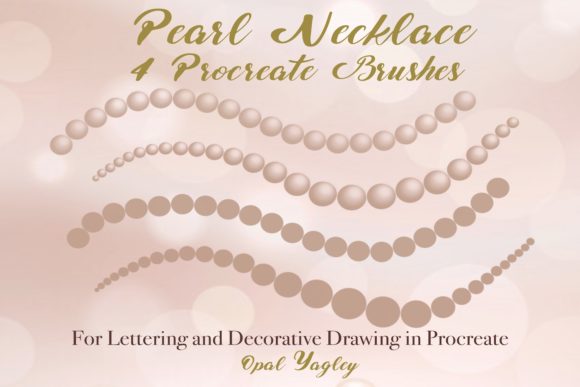
4 Pearl Necklace Procreate Brushes for iPad Art
Digital illustration often struggles to capture the tactile satisfaction of traditional media, particularly when rendering intricate textures like jewelry. The 4 Pearl Necklace Procreate Brushes set addresses this specific challenge by offering a specialized toolkit designed exclusively for the iPad ecosystem. Whether you are crafting elegant wedding invitations, designing luxury branding, or simply adding a touch of sophistication to your lettering, these tools provide a streamlined way to incorporate realistic pearl details without the need for manual, repetitive drawing.
It is crucial to understand from the outset that this toolset is built specifically for the Apple ecosystem. To utilize these brushes effectively, you must have an iPad or iPad Pro paired with an Apple Pencil or a compatible pressure-sensitive stylus. The functionality relies entirely on the Procreate app's engine to interpret stroke dynamics. Consequently, these brushes do not work in Photoshop, Illustrator, or other desktop-based graphic design applications. This limitation ensures that the brush behavior remains optimized for the fluid, touch-based workflow that iPad artists expect.
Understanding the Brush Mechanics
The core value of this collection lies in its versatility, offering four distinct variations within a single .brushset file. This allows artists to switch between styles seamlessly depending on the visual weight and dimensionality required for their project.
- 2D Pearl Necklace Monoline: This brush renders pearls of equal size throughout the entire stroke. It is ideal for creating consistent, decorative borders or outlining shapes where uniformity is key.
- 3D Pearl Necklace Monoline: Similar to the 2D version, this maintains equal pearl sizing but adds shading and highlighting to create a convincing three-dimensional sphere effect, giving the illusion of depth on a flat screen.
- 2D Pearl Necklace Pressure: Here, the size of the pearls varies dynamically based on the pressure applied with the stylus. A light touch creates tiny dots, while pressing harder generates larger pearls, mimicking natural hand movement.
- 3D Pearl Necklace Pressure: This combines the dimensional shading of the 3D monoline with the dynamic sizing of the pressure variant, offering the most organic and realistic look for freehand drawing.
One of the most empowering features of digital art is the ability to manipulate color instantly. While these brushes come with default settings, users can easily change the colors of the pearls as needed. By adjusting the hue, saturation, and brightness in Procreate's color panel, a single brush can simulate white freshwater pearls, golden South Sea pearls, or even whimsical, non-traditional colors to match any brand palette or artistic vision.
Perspectives for Different Creators
The utility of the 4 Pearl Necklace Procreate Brushes shifts significantly depending on who is holding the Apple Pencil. What matters most to a hobbyist may differ entirely from the priorities of a commercial entrepreneur.
For Beginners and Hobbyists
If you are new to digital lettering or iPad art, the primary concern is often ease of use and immediate gratification. Drawing a perfect string of pearls manually requires steady hands and an understanding of light sources to create realistic shadows. These brushes remove that technical barrier. A beginner can focus on the composition of their piece—perhaps a motivational quote or a journal header—without getting bogged down in the mechanics of rendering individual spheres. The "Monoline" options are particularly forgiving, allowing for clean lines even if hand stability is still developing. For the hobbyist, the value lies in the fun factor; it transforms a complex texture into a playful element that encourages experimentation.
For Professional Designers and Freelancers
Experienced creators and freelancers operating in the wedding or luxury sectors prioritize speed and reliability. When working on client projects, such as custom wedding suites or high-end product packaging, time is money. Manually painting hundreds of pearls for a border is inefficient. These brushes allow professionals to draft intricate decorative elements in seconds. The "Pressure" variants offer the flexibility needed to create organic, hand-drawn feels that clients often prefer over rigid, vector-like perfection. Furthermore, the ability to quickly swap colors means a designer can present multiple mockups to a client during a single meeting, enhancing the perceived value of their service.
For Educators and Content Creators
Instructors teaching digital art or bloggers creating tutorial content look for tools that demonstrate technical concepts clearly. These brushes serve as excellent teaching aids for explaining how pressure sensitivity works in Procreate. An educator can show students the difference between monoline and pressure-sensitive strokes in real-time. Additionally, for marketers and influencers creating social media graphics, the aesthetic appeal of pearl details can elevate the perceived quality of a post, making content stand out in a crowded feed. The visual richness of the 3D options adds a layer of polish that suggests high production value.
For Small Business Owners
Entrepreneurs managing their own branding often wear many hats. For a small business owner selling handmade goods or digital planners, the commercial value of these brushes is significant. They enable the creation of unique assets without hiring a separate illustrator. Whether designing a logo, a thank-you card included in shipments, or promotional materials, the pearl motif conveys elegance and attention to detail. The long-term usefulness of the tool comes from its adaptability; the same brush used for a holiday promotion can be recolored and repurposed for a spring collection, maximizing the return on investment.
Practical Application and Workflow
Integrating these brushes into your workflow is straightforward, provided you have the necessary hardware. Once the .brushset file is imported into Procreate, it appears in your brush library. The creative process then becomes a matter of intention.
Consider a scenario where you are designing a birth announcement. You might start with the 3D Pearl Necklace Pressure brush to draw a flowing, organic frame around the text, varying the pressure to make the corners feel heavier and more grounded. If you need a strict divider line beneath a heading, switching to the 2D Pearl Necklace Monoline ensures a uniform, neat row of pearls that doesn't distract from the typography. Because the brushes are native to Procreate, they respond to tilt and opacity settings just like standard pencils, allowing for further customization if you wish to fade the pearls into the background.
It is also worth noting the importance of working with passion. Digital tools are merely extensions of the artist's intent. While these brushes automate the shape of the pearls, the artistic direction—the curve of the line, the spacing, and the color choices—remains entirely in your hands. This balance between automation and creative control is what makes the set valuable. It handles the repetitive texture work, freeing you to focus on the emotional resonance of the artwork.
Making the Right Choice for Your Needs
Deciding whether the 4 Pearl Necklace Procreate Brushes are right for you depends on your current toolkit and project goals. If you primarily work in Photoshop on a desktop, these brushes will not function, and you would need to seek alternative solutions compatible with your software. However, if your workflow centers around the iPad and you frequently find yourself wishing for faster ways to add decorative, luxurious elements to your work, this set offers a targeted solution.
Evaluate your needs based on flexibility versus consistency. Do you need the organic variation of pressure-sensitive strokes, or do you require the architectural precision of monoline weights? Fortunately, this set includes both, covering a wide spectrum of use cases. From the student learning the ropes of digital illustration to the seasoned pro tightening up a client deliverable, the ability to toggle between 2D and 3D styles ensures that the tool grows with your skill level.
Ultimately, the goal is to enhance your creative expression. By removing the friction of drawing complex textures manually, these brushes allow you to maintain your flow state. Whether you are decorating a digital planner, embellishing a portrait, or crafting a unique signature style, having reliable, high-quality decorative tools at your fingertips can make the difference between a good piece of art and a great one. Embrace the possibilities of your iPad, experiment with the different pressure settings, and let the details shine.